Nov 30, 2011

How To Jailbreak iOS 5 Semi-Tethered On iPhone, iPad, iPod touch

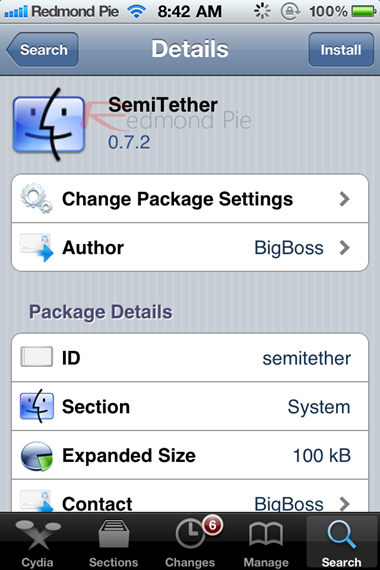
A new Cydia package called “SemiTether” jailbreak for iOS 5 is now available on BigBoss repository which basically helps reboot tethered-jailbroken iPhone, iPad and iPod touch without having to plug in your device into PC or Mac. This is second best thing to having an untethered jailbreak. The only one downside to it is that it doesn’t allow you to use Safari, Mail, Cydia, and jailbreak apps installed on your device. As BigBoss describes it:

it is protection for if your device reboots while you’re on the road.

iOS 5 pwned 2

Here’s how to make it work:

NOTE: This wont work with iPhone 4S or iPad 2.

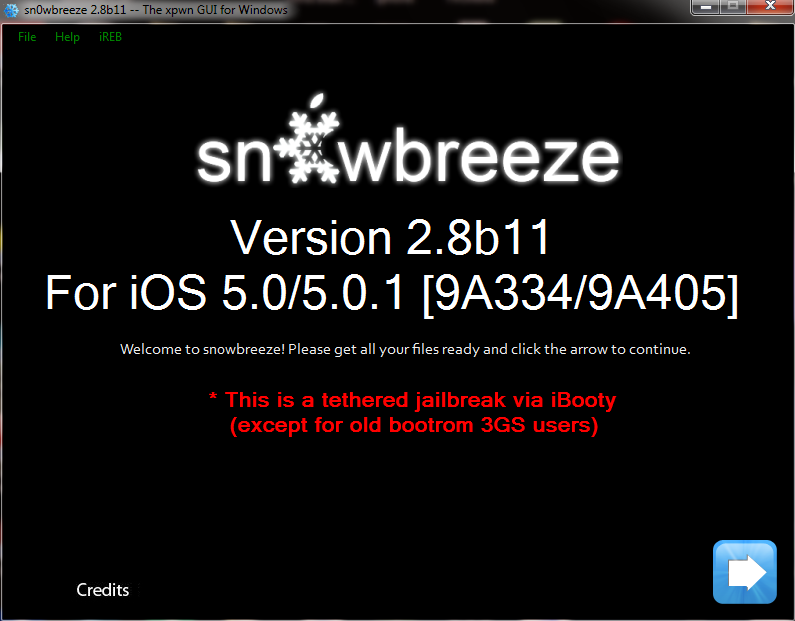
Step 1: Download the latest version of Redsn0w for Windows or Mac, and follow our complete step by step guide posted here to tether-jailbreak your device. Alternatively, those of you who rely on an Ultrasn0w or Gevey SIM unlock can use Sn0wbreeze for tether-jailbreaking their device on iOS 5 with preserved baseband, step by step instructions for which can be found here.

Screen Shot 2011-10-13 at 8.05.39 AM

Step 2: Once you are done with tether-jailbreak, Start Cydia, and add http://thebigboss.org/semitether as repository on Cydia.

Step 3: Now search for “SemiTether” package on Cydia and install it! You are done!
SemiTether

Now you will be able to reboot your tether-jailbroken device on the go even without a PC or a Mac. But as described above, you wont be able to use Mail, Safari and Cydia till you boot the device back into a tethered jailbroken state using Redsn0w. To do this, start Redsn0w, go into “Extras”, select “Just Boot” option and enter DFU mode. Redsn0w should now boot your device as tethered. Sn0wbreeze users can alternatively use iBooty to enter tethered jailbroken state.

Screen Shot 2011-10-13 at 8.05.49 AM

Once done, you should now be able to use Mail, Safari and Cydia again.

To recap, with a semi-tethered jailbreak, you can use your device for text messages, stock apps (except for Safari and Mail), camera, settings, etc. You wont be able to use any web browsing app which uses Safari, stock Mail app, Cydia, and any jailbreak apps that you have installed on your device. Of course all the functionality will be restored once you have booted your device back into tethered jailbreak state. The limited functionality offered by this semi-tethered jailbreak is obviously better than not having it at all.

Full untethered jailbreak for iOS 5 isn’t available yet. Chronic Dev-Team is said to be working hard on it. Recently, i0n1c also confirmed that an untethered jailbreak solution for iOS 5, which will also support iPhone 4S and iPad 2, was “covered”. If and when iOS 5 gets a full untethered jailbreak, you can be rest assured that we will have it covered here on Redmond Pie!

Update x1: iOS 5.0.1 is now available, and it can be jailbroken semi-tethered using Redsn0w, Sn0wbreeze, and SemiTether package from Cydia.

source

Jailbreak iOS 5 - iPhone 4, 3GS, iPod Touch 4G, 3G, iPad [Tutorial]

How to jailbreak iOS 5 on iPhone 4, 3GS, iPod Touch 4G, 3G and iPad? iH8sn0w and MuscleNerd, the well-know iPhone hackers have just give us some good news, they have confirmed on their Twitter that the current version of Redsn0w and sn0wbreeze can jailbreak iOS 5 on iPhone 4, 3GS, iPod touch 4G, 3G and iPad 1. So far iOS 5 jailbreak is tethered jailbreak.

What Does Tethered Jailbreak Mean :

Tethered jailbreak means you will have to use redsn0w to enter DFU mode and have it “just boot tethered” every time you power cycle your device.

Important Note: iPhone users, if you rely on unlock you MUST stay away from iOS 5 update, it will break your unlock as it will upgrade your iPhone baseband to one that can't be unlocked. Dev-team will release Redsn0w 0.9.9b5 to let unlockers able to upgrade to iOS 5 with preserving the unlockable basebands.

Jailbreak iOS 5 - Supported devices :

  • iPod touch 3G
  • iPod touch 4G
  • iPad 1
  • iPhone3GS
  • iPhone4 (GSM)
  • iPhone4 (CDMA)
So far, iPad 2 and iPhone 4S are not supported with this jailbreak as they powered with higher hardware (A5-porcessor) than the above devices


Required Downloads:

Jailbreak iOS 5 - iPhone 4, 3GS,iPod Touch 4G, 3G, iPad [Tutorial] :


Step 1: Connect your iDevice with your PC via USB, and open iTunes 10.5 then Restore to iOS 5.0

Step 2: Start Redsn0w, press on "Extras > Select IPSW" and point it to iOS 5.0 firmware ipsw file.


Step 3: Now select “Install Cydia” and click “Next”. Optionally (if available), you can also select any other option you like.
Step 4: Now make sure your device is both OFF and PLUGGED IN to the computer before you click “Next”.
At this stage you will be presented with a screen where you will be guided on how to enter DFU mode. Quickly hold “Power” button and then while holding the “Power” button, you will now have to hold “Home” button too. Now after few seconds release “Power” button but keep holding “Home” button until installation begins.

Step 5: Wait until you get iOS 5.0 jailbroken in few minutes. Congratulations.

Tethered Jailbreak : Once current Redsn0w jailbreak is still tethered jailbreak, you will be required to connect your iOS device with your computer and run Redsn0w again then choose "Just boot tethered right now".

source

Nov 28, 2011

Dev Team Working on “Very Promising” iPhone 4S Unlock

Dev Team frontman and unlock guru MuscleNerd has given an update on a new unlock for the newly-released iPhone 4S. According to MuscleNerd, a “very promising” unlock for the new handset is “in the works.”

While iPhone 3GS and iPhone 4 owners with older basebands have been able to unlock after jailbreaking for awhile now, there’s a whole set of newer basebands waiting for an UltraSn0w update.

UltraSn0w lets jailbreakers unlock the iPhone for free to use on different carriers, and there hasn’t been a baseband update for quite some time. Currently, UltraSn0w for iOS 5 supports the following basebands on the iPhone 3GS: 4.26.08, 05.11.07, 05.12.01, 05.13.04, and 06.15.00. The 01.59.00 baseband is also supported on the iPhone 4. There are multiple iPhone 4 basebands that have yet to be unlocked with an UltraSn0w update.

The Gevey SIM hardware unlock supports the same basebands as UltraSn0w on iOS 5. You must preserve your baseband when jailbreaking (tethered or semitethered) by using either RedSn0w or Sn0wBreeze if you want to keep unlocking.

Obviously, an unlock for the iPhone 4S will require a jailbreak, and an untethered jailbreak is also in the works for iOS 5. The Chronic Dev Team gave an update late last night on the status of the iOS 5 jailbreak. Hackers are working feverishly to uncover stable exploits, and they want your help.

MuscleNerd hasn’t given an exact ETA on the UltraSn0w update, but potential unlockers with newer basebands shouldn’t be left out in the cold much longer.

New iPhone Firmware Files

http://news.softpedia.com/images/news2/Official-iPhone-3-1-IPSW-Download-Breaks-Tethering-2.jpg

5.0 (3GS): iPhone2,1_5.0_9A334_Restore.ipsw
5.0 (4 GSM): iPhone3,1_5.0_9A334_Restore.ipsw
5.0 (4 CDMA): iPhone3,3_5.0_9A334_Restore.ipsw
5.0 (4S): iPhone4,1_5.0_9A334_Restore.ipsw
5.0.1 (3GS): iPhone2,1_5.0.1_9A405_Restore.ipsw
5.0.1 (4 GSM): iPhone3,1_5.0.1_9A405_Restore.ipsw
5.0.1 (4 CDMA): iPhone3,3_5.0.1_9A405_Restore.ipsw
5.0.1 (4S): iPhone4,1_5.0.1_9A405_Restore.ipsw

Ih8sn0w Update sn0wbreeze v2.8b11


===============================
sn0wbreeze v2.8 [BETA 11]:
===============================
* Supports iOS 5.0 (9A334)/5.0.1 (9A405)
* Fixed iBooks sandbox crashing issues (as of 2.8b9).
* Fixed location services issues with iPhone 3GS
users running the iPad baseband (as of 2.8b9).
* Re-added iPad baseband install option to iPhone 3GS.
* Tethered devices are booted via iBooty which is
extracted to the Desktop after running sn0wbreeze.
===============================
Tethered?
===============================
- iPhone 3GS (old bootrom)...NO
- iPhone 3GS (new bootrom)..YES
- iPhone 4 (GSM)............YES
- iPhone 4 (CDMA)...........YES
- iPod Touch 3G.............YES
- iPod Touch 4..............YES
- iPad 1G...................YES
===============================

************************************************
** iPhone 3GS iPad baseband (06.15.00) users: **
************************************************
- Re-flash the iPad baseband via sn0wbreeze
if you restore(d) to a stock 5.0 firmware.
************************************************


Download: Sn0wbreeze v2.8b11

Ac1dSn0w is a New Utility to Jailbreak iOS 5 [Update]

Ac1dSn0w

Beta 1

I’m pleased to announce that we’ve just released Beta 1 of Ac1dSn0w for Mac OS X Lion (should also work on Snow Leopard). Ac1dSn0w allows you to jailbreak your iDevice tethered. It also provides features like Tethered Boot, Pwned DFU, and Exit Recovery to get your device out of Recovery Loop.

Supported Devices (iOS5/iOS5.0.1):

  • iPhone 3Gs
  • iPhone 4
  • iPod Touch 4 G
  • iPad 1
You may have to perform the following steps in order to jailbreak your device successfully.

1. Download Ac1dSn0w from (Down due to legal complication)

2. After downloading, open it and you’ll see the following screen:

Note:
You can click ‘Show Console’ to see some device related information. It also shows you the current state of your jailbreaking process. The Assistant Panel helps you to put your device into DFU Mode.

3. Connect your device with your Mac.

4. Turn your device off.

5. Click ‘Show Assistant’ and follow the onscreen instructions to enter DFU Mode.

6 . Once you’re in DFU Mode just hit the ‘Jailbreak’ Button and wait until it’s done (the device will reboot).

7. Put your device again into DFU Mode (Step 5) and hit the ‘Tethered Boot’ Button.

Done: Your device should now be jailbroken with Cydia installed.

Upcoming Features

The current version of Ac1dSn0w is in an early development stage. In the future it will also be able to jailbreak remote devices. This means that you just need to install a server program on any OS (Linux, BSD, Windows) and Ac1dSn0w will jailbreak it on a client machine anywhere in the world. Other upcoming features are:

  • Custom Firmware Creation
  • iRecovery Remote (you can talk to remote devices and send your own payloads etc)

Nov 25, 2011

Official Apple iOS Firmware+Jailbreaking Software's


Quote:
Apple's Stuff

Quote:
Apple's Official iTunes
(we recommend you to use new iTunes)
iTunes:iTunes is a proprietary media player computer program, used for playing and organizing digital music and video files on desktop computers. It can also manage contents on iPod, iPhone and iPad.

iTunes can connect to the iTunes Store to purchase and download music, music videos, television shows, iPod games, audiobooks, podcasts, movies and movie rentals (not available in all countries), and ringtones (only available on iPhone and iPod Touch 4th Generation). It is also used to download application software from the App Store for the iPhone, iPad and iPod Touch. iTunes has been criticized for not being able to transfer music from one portable device to another.


  • Please note that if you use Safari you must disable the auto unzip feature. It may be easier to just use Firefox!

Quote:
Apple's Official Iphone Firmware's

1.0.0: iPhone1,1_1.0_1A543a_Restore.ipsw
1.0.1: iPhone1,1_1.0.1_1C25_Restore.ipsw
1.0.2: iPhone1,1_1.0.2_1C28_Restore.ipsw
1.1.1: iPhone1,1_1.1.1_3A109a_Restore.ipsw
1.1.2: iPhone1,1_1.1.2_3B48b_Restore.ipsw
1.1.3: iPhone1,1_1.1.3_4A93_Restore.ipsw
1.1.4: iPhone1,1_1.1.4_4A102_Restore.ipsw
2.0.0 (2G): iPhone1,1_2.0_5A347_Restore.ipsw
2.0.0 (3G): iPhone1,2_2.0_5A347_Restore.ipsw
2.0.1 (2G): iPhone1,1_2.0.1_5B108_Restore.ipsw
2.0.1 (3G): iPhone1,2_2.0.1_5B108_Restore.ipsw
2.0.2 (2G): iPhone1,1_2.0.2_5C1_Restore.ipsw
2.0.2 (3G): iPhone1,2_2.0.2_5C1_Restore.ipsw
2.1.0 (2G): iPhone1,1_2.1_5F136_Restore.ipsw
2.1.0 (3G): iPhone1,2_2.1_5F136_Restore.ipsw
2.2.0 (2G): iPhone1,1_2.2_5G77_Restore.ipsw
2.2.0 (3G): iPhone1,2_2.2_5G77_Restore.ipsw
2.2.1 (2G): iPhone1,1_2.2.1_5H1_Restore.ipsw
2.2.1 (3G): iPhone1,2_2.2.1_5H11_Restore.ipsw
3.0.0 (2G): iPhone1,1_3.0_7A341_Restore.ipsw
3.0.0 (3G): iPhone1,2_3.0_7A341_Restore.ipsw
3.0.0 (3GS): iPhone2,1_3.0_7A341_Restore.ipsw
3.0.1 (2G): iPhone1,1_3.0.1_7A400_Restore.ipsw
3.0.1 (3G): iPhone1,2_3.0.1_7A400_Restore.ipsw
3.0.1 (3GS): iPhone2,1_3.0.1_7A400_Restore.ipsw
3.1.0 (2G): iPhone1,1_3.1_7C144_Restore.ipsw
3.1.0 (3G): iPhone1,2_3.1_7C144_Restore.ipsw
3.1.0 (3GS): iPhone2,1_3.1_7C144_Restore.ipsw
3.1.2 (2G): iPhone1,1_3.1.2_7D11_Restore.ipsw
3.1.2 (3G): iPhone1,2_3.1.2_7D11_Restore.ipsw
3.1.2 (3GS): iPhone2,1_3.1.2_7D11_Restore.ipsw
3.1.3 (2G): iPhone1,1_3.1.3_7E18_Restore.ipsw
3.1.3 (3G): iPhone1,2_3.1.3_7E18_Restore.ipsw
3.1.3 (3GS): iPhone2,1_3.1.3_7E18_Restore.ipsw
4.0.0 (3G): iPhone1,2_4.0_8A293_Restore.ipsw
4.0.0 (3GS): iPhone2,1_4.0_8A293_Restore.ipsw
4.0.0 (4): iPhone3,1_4.0_8A293_Restore.ipsw
4.0.1 (3G): iPhone1,2_4.0.1_8A306_Restore.ipsw
4.0.1 (3GS): iPhone2,1_4.0.1_8A306_Restore.ipsw
4.0.1 (4): iPhone3,1_4.0.1_8A306_Restore.ipsw
4.0.2 (3G): iPhone1,2_4.0.2_8A400_Restore.ipsw
4.0.2 (3GS): iPhone2,1_4.0.2_8A400_Restore.ipsw
4.0.2 (4): iPhone3,1_4.0.2_8A400_Restore.ipsw
4.1.0 (3G): iPhone1,2_4.1_8B117_Restore.ipsw
4.1.0 (3GS): iPhone2,1_4.1_8B117_Restore.ipsw
4.1.0 (4): iPhone3,1_4.1_8B117_Restore.ipsw
4.2.1 (3G): iPhone1,2_4.2.1_8C148_Restore.ipsw
4.2.1 (3GS): iPhone2,1_4.2.1_8C148a_Restore.ipsw
4.2.1 (4): iPhone3,1_4.2.1_8C148_Restore.ipsw
4.2.6 (4 CDMA): iPhone3,3_4.2.10_8E600_Restore.ipsw
4.3.0 (3GS): iPhone2,1_4.3_8F190_Restore.ipsw
4.3.0 (4 GSM): iPhone3,1_4.3_8F190_Restore.ipsw
4.3.1 (3GS): iPhone2,1_4.3.1_8G4_Restore.ipsw
4.3.1 (4 GSM): iPhone3,1_4.3.1_8G4_Restore.ipsw
4.3.2 (3GS): iPhone2,1_4.3.2_8H7_Restore.ipsw
4.3.2 (4 GSM): iPhone3,1_4.3.2_8H7_Restore.ipsw
4.2.7 (4 CDMA): iPhone3,3_4.2.7_8E303_Restore.ipsw
4.2.8 (4 CDMA): iPhone3,3_4.2.8_8E401_Restore.ipsw
4.3.3 (3GS): iPhone2,1_4.3.3_8J2_Restore.ipsw
4.3.3 (4 GSM): iPhone3,1_4.3.3_8J2_Restore.ipsw
4.2.9 (4 CDMA): iPhone3,3_4.2.9_8E501_Restore.ipsw
4.3.4 (3GS): iPhone2,1_4.3.4_8K2_Restore.ipsw
4.3.4 (4 GSM): iPhone3,1_4.3.4_8K2_Restore.ipsw
4.2.10 (4 CDMA): iPhone3,3_4.2.10_8E600_Restore.ipsw
4.3.5 (3GS): iPhone2,1_4.3.5_8L1_Restore.ipsw
4.3.5 (4 GSM): iPhone3,1_4.3.5_8L1_Restore.ipsw

5.0 (3GS): iPhone2,1_5.0_9A334_Restore.ipsw
5.0 (4 GSM): iPhone3,1_5.0_9A334_Restore.ipsw
5.0 (4 CDMA): iPhone3,3_5.0_9A334_Restore.ipsw
5.0 (4S): iPhone4,1_5.0_9A334_Restore.ipsw
Quote:
Apple's Official Ipad Firmware's

3.2.0: iPad1,1_3.2_7B367_Restore.ipsw
3.2.1: iPad1,1_3.2.1_7B405_Restore.ipsw
3.2.2: iPad1,1_3.2.2_7B500_Restore.ipsw
4.2.1: iPad1,1_4.2.1_8C148_Restore.ipsw
4.3.0 (iPad 1): iPad1,1_4.3_8F190_Restore.ipsw
4.3.0 (iPad 2 Wi-Fi): iPad2,1_4.3_8F191_Restore.ipsw
4.3.0 (iPad 2 GSM): iPad2,2_4.3_8F191_Restore.ipsw
4.3.0 (iPad 2 CDMA): iPad2,3_4.3_8F191_Restore.ipsw
4.3.1 (iPad 1): iPad1,1_4.3.1_8G4_Restore.ipsw
4.3.1 (iPad 2 Wi-Fi): iPad2,1_4.3.1_8G4_Restore.ipsw
4.3.1 (iPad 2 GSM): iPad2,2_4.3.1_8G4_Restore.ipsw
4.3.1 (iPad 2 CDMA): iPad2,3_4.3.1_8G4_Restore.ipsw
4.3.2 (iPad 1): iPad1,1_4.3.2_8H7_Restore.ipsw
4.3.2 (iPad 2 Wi-Fi): iPad2,1_4.3.2_8H7_Restore.ipsw
4.3.2 (iPad 2 GSM): iPad2,2_4.3.2_8H7_Restore.ipsw
4.3.2 (iPad 2 CDMA): iPad2,3_4.3.2_8H8_Restore.ipsw
4.3.3 (iPad 1): iPad1,1_4.3.3_8J3_Restore.ipsw
4.3.3 (iPad 2 Wi-Fi): iPad2,1_4.3.3_8J2_Restore.ipsw
4.3.3 (iPad 2 GSM): iPad2,2_4.3.3_8J2_Restore.ipsw
4.3.3 (iPad 2 CDMA): iPad2,3_4.3.3_8J2_Restore.ipsw
4.3.4 (iPad 1): iPad1,1_4.3.4_8K2_Restore.ipsw
4.3.4 (iPad 2 Wi-Fi): iPad2,1_4.3.4_8K2_Restore.ipsw
4.3.4 (iPad 2 GSM): iPad2,2_4.3.4_8K2_Restore.ipsw
4.3.4 (iPad 2 CDMA): iPad2,3_4.3.4_8K2_Restore.ipsw
4.3.5 (iPad 1): iPad1,1_4.3.5_8L1_Restore.ipsw
4.3.5 (iPad 2 Wi-Fi): iPad2,1_4.3.5_8L1_Restore.ipsw
4.3.5 (iPad 2 GSM): iPad2,2_4.3.5_8L1_Restore.ipsw
4.3.5 (iPad 2 CDMA): iPad2,3_4.3.5_8L1_Restore.ipsw

5.0 (iPad 1): iPad1,1_5.0_9A334_Restore.ipsw
5.0 (iPad 2 Wi-Fi): Pad2,1_5.0_9A334_Restore.ipsw
5.0 (iPad 2 GSM): iPad2,2_5.0_9A334_Restore.ipsw
5.0 (iPad 2 CDMA): iPad2,3_5.0_9A334_Restore.ipsw
Quote:
Apple's Official Ipod Firmware's

1.1: iPod1,1_1.1_3A101a_Restore.ipsw
1.1.1: iPod1,1_1.1.1_3A110a_Restore.ipsw
1.1.2: iPod1,1_1.1.2_3B48b_Restore.ipsw
1.1.3: iPod1,1_1.1.3_4A93_Restore.ipsw
1.1.4: iPod1,1_1.1.4_4A102_Restore.ipsw
1.1.5: iPod1,1_1.1.5_4B1_Restore.ipsw
2.0.0: iPod1,1_2.0_5A347_Restore.ipsw (Must purchase through iTunes)
2.0.1: iPod1,1_2.0.1_5B108_Restore.ipsw
2.2.0 (1G): iPod1,1_2.2_5G77_Restore.ipsw
2.2.0 (2G): iPod2,1_2.2_5G77a_Restore.ipsw
2.2.1 (2G): iPod2,1_2.2.1_5H11a_Restore.ipsw
3.1.2 (3G): iPod3,1_3.1.2_7D11_Restore.ipsw
3.1.3 (3G): iPod3,1_3.1.3_7E18_Restore.ipsw
4.0.0 (2G): iPod2,1_4.0_8A293_Restore.ipsw
4.0.0 (3G): iPod3,1_4.0_8A293_Restore.ipsw
4.0.2 (2G): iPod2,1_4.0.2_8A400_Restore.ipsw
4.0.2 (3G): iPod3,1_4.0.2_8A400_Restore.ipsw
4.1.0 (2G): iPod2,1_4.1_8B117_Restore.ipsw
4.1.0 (3G): iPod3,1_4.1_8B117_Restore.ipsw
4.1.0 (4G): iPod4,1_4.1_8B117_Restore.ipsw
4.2.1 (2G): iPod2,1_4.2.1_8C148_Restore.ipsw
4.2.1 (3G): iPod3,1_4.2.1_8C148_Restore.ipsw
4.2.1 (4G): iPod4,1_4.2.1_8C148_Restore.ipsw
4.3.0 (3G): iPod3,1_4.3_8F190_Restore.ipsw
4.3.0 (4G): iPod4,1_4.3_8F190_Restore.ipsw
4.3.1 (3G): iPod3,1_4.3.1_8G4_Restore.ipsw
4.3.1 (4G): iPod4,1_4.3.1_8G4_Restore.ipsw
4.3.2 (3G): iPod3,1_4.3.2_8H7_Restore.ipsw
4.3.2 (4G): iPod4,1_4.3.2_8H7_Restore.ipsw
4.3.3 (3G): iPod3,1_4.3.3_8J2_Restore.ipsw
4.3.3 (4G): iPod4,1_4.3.3_8J2_Restore.ipsw
4.3.4 (3G): iPod3,1_4.3.4_8K2_Restore.ipsw
4.3.4 (4G): iPod4,1_4.3.4_8K2_Restore.ipsw
4.3.5 (3G): iPod3,1_4.3.5_8L1_Restore.ipsw
4.3.5 (4G): iPod4,1_4.3.5_8L1_Restore.ipsw

5.0 (3G): iPod3,1_5.0_9A334_Restore.ipsw
5.0 (4G): iPod4,1_5.0_9A334_Restore.ipsw
Quote:
Dev-Team
Quote:
Redsn0w's By Iphone.dev-Team
redsn0w is a utility to jailbreak iOS devices. It does so by reading the stock firmware that can be downloaded from iTunes or from various locations on the internet (as iTunes will detect and delete old firmwares), and then running a payload directly on the device in the form of a ramdisk. When jailbreaking, the device will also enter into Device Firmware Upgrade mode. It allows users to install Cydia, the popular 3rd party app installer. This allows the user access to tweaks, homebrew applications, the root directory and the file system.


Redsn0w 0.9.9b6 For Jailbreak 4.0-4.3.3(untethered),4.3.4&4.3.5(tethered),ios5 Quick jailbreak(tethered)
support custom IPSW for MAC & WINDOW


Redsn0w 0.9.9b4 For Jailbreak 4.0-4.3.3(untethered),4.3.4,4.3.5&ios5.0(tethered)

Redsn0w 0.9.9b1 For Jailbreak 4.0-4.3.3(untethered),4.3.4&4.3.5(tethered),ios5beta1-7(tethered)

Redsn0w 0.9.8b7c For Jailbreak iOS 5.0 beta7 & 4.3.5(point 4.3.5) Tethered (Mac & Win)

Redsn0w 0.9.8b6 For Jailbreak iOS 5.0 beta6 Tethered (Mac & Win)

Redsn0w 0.9.8b5 For Jailbreak iOS 5.0 beta5 Tethered (Mac & Win)
.
Redsn0w 0.9.8b4 For Jailbreak iOS 5.0 beta4 & iOS 4.3.5(point 4.3.4) Tethered (Mac & Win)
.
Redsn0w 0.9.8 For Jailbreak iOS 5.0 beta Tethered (Mac & Win)
.
Redsn0w 0.9.6rc For Jailbreak iOS 4.3.3 (Mac & Win)
.
Redsn0w 0.9.6rc For Jailbreak iOS 4.3.2 (Mac & Win)
.
Redsn0w 0.9.6rc For Jailbreak iOS 4.3.1 (Mac & Win)
.
Redsn0w 0.9.7 For Jailbreak iOS 4.2.1 (Only for Mac OS)
.
Redsn0w 0.9.6 For Jailbreak iOS 4.1 (Mac & Win)
.
Redsn0w 0.9.5 For Jailbreak iOS 4.0 (Mac & Win)
.
Redsn0w 0.9.4 For Jailbreak iOS 3.1.3 (Mac & Win)
.
Redsn0w 0.9.3 For Jailbreak iOS 3.1.2 (Mac & Win)
.
Redsn0w 0.9.2 For Jailbreak iOS 3.1.2 (Mac & Win)

Few More From Old-Torrent Links


BootLoaders-Iphone 2G

Quote:
PwnageTool's By Iphone.dev-Team

PwnageTool:PwnageTool allows you to restore to a custom IPSW file. For instance, you can restore to a pre-jailbroken firmware while simultaneously maintaining your current baseband (and thus your ultrasn0w carrier unlock). You can also add whatever packages you want in the “Expert” mode of PwnageTool, if you wish to pre-install Cydia packages.

Quote:
limera1n & blackra1n By Geohot


Quote:
limera1n


limera1n:This is geohot's jailbreak utility. It uses an undisclosed bootrom exploit and comex's Packet Filter Kernel Exploit to achieve an untethered jailbreak on newer devices.


which can jailbreak iPhone 4, iPhone 3GS, iPhone 3G on iOS 4.1, iPod touch on iOS 4.1 and iPad on iOS 3.2.2.


Windows
Mac OS X
Quote:
blackra1n

blackra1n:blackra1n is a program that jailbreaks version 3.1.2 of Apple's operating system for iDevices, known as iOS.

Windows
Mac OS X
Quote:
IH8Sn0w

Quote:
Sn0wbreze By IH8Sn0w
sn0wbreeze is a tool for Windows® that will jailbreak your iPods, iPads, iPhones!

Setup custom boot logos, activate your iPhone, set a root partition size, build custom firmware, install SSH, and more!

Quote:
iREB By IH8Sn0w

iREB:iREB is a tool for Windows® that will put your device into a pwned state so that you can upload custom firmware to it.

Quote:
iFaith By IH8Sn0w

iFaith:iFaith is the first public SHSH Dumper that dumps the SHSH blobs for the current iOS revision running on your iDevice.

* Dumps SHSH Blobs
* Build *signed* IPSW with dumped SHSH blobs or TinyUmbrella SHSH blobs.
* Submits dumped SHSH blobs to remote server for backup.
Quote:
iDetector By IH8Sn0w

iDetector:iDetector is a real easy to use application to tell wheter or not your
iPhone 3G[S] contains the New Bootrom or the Old bootrom.
Simply place your 3GS into DFU mode and click the button
Quote:
f0recast By IH8Sn0w

f0recast:f0recast is a tool for Windows® & Mac OS X that will check your iPods and iPhones to determine whether it is tethered or unlockable (iPhone only).

It is just a really simple app for users who are confused as to whether or not their devices can be jailbroken and unlocked.

It even tells iPhone users their bootloader version, so that if you are on an iPhone 3G with the 5.8 bootloader, it will notify you that you can downgrade your baseband to an unlockable version.


Requirements [Windows]:


Requirements [Macintosh]:


Quote:
TinyUmbrella By notcom

TinyUmbrella:TinyUmbrella is a combination of two earlier tools, all of which were written by semaphore. It requires Java to be installed (Windows users need the 32-bit version, regardless of OS architecture).

Umbrella -- used to save the SHSH file of your iDevice to make it possible to later downgrade or restore the firmware. It even works with non-jailbroken devices.
TinyTSS -- local server used to playback saved SHSH files during an iTunes restore.


Quote:
Chronic Dev Team

Quote:
GreenPois0n By p0sixninja

GreenPois0n:For those of you who don’t know, GreenPois0n is based on a low-level bootrom exploit used by Geohot in Limera1n tool which Apple won’t be able to patch with a new iOS firmware; instead, they will have to introduce a new hardware for the current devices to close the loophole.

For iOS Firmware 4.2.1:

Greenpois0n RC6.1
Win - Download (MD5: 99e9082c3b482d02978afbabb20bd1e9)
MacOSX - Download (MD5: 57ec49739b2c3d2a991e83f1e2738115)

For iOS Firmware 4.1:

Greenpois0n RC4
WinDownload (MD5: 4fdd558f94b5fdd06d50d6bad31c55ba)
MacOSXDownload (MD5: bdcc6aa6617a5a67309e2e0afe049447)
Linux (RC3.3) – Download (MD5: 73c75297a4ba1dec69f15a38f462dbf5)
  • We will update this post as new links become available.

Followers