Download
SAMSUNG U600 (100% Tested Solution) Exe 2011
Feb 28, 2011
 samsung all new model mic solution by helpful-man
Get started with Cyclone box (video)
Video
Get Started with CYCLONE BOX
by Gsm Free Shop
Contents:
1. Registration
2. Box Firmware Update
3 Credit fill
4. Presentations of dct4/bb5 flashing GUI
5. Presentation of files supply server
Successfully unlocked/repaired phones by Mcnpro Box
ztc818 write flash ok with mcnpro
good work with mcnpro you are the tools for chiness mobile
see logs
Writing, Please Power Off & On
Connected
Boot Information:
downloading Boot
CPU Type: 6600D
Flash Type: SAMSUNG K5L2931CAM
Flash Type: SAMSUNG K5L2931CAM
Flsh Size??01000000(Hex Bytes)
Baudrate set to:921600
Erase Nor Flash...
Erase OK??Time: 97 s
Writing(amd Nor)...
Write OK
>>Time£º 35 m27 s
more...
link here...
http://forum.gsmhosting.com

good work with mcnpro you are the tools for chiness mobile
see logs
Writing, Please Power Off & On
Connected
Boot Information:
downloading Boot
CPU Type: 6600D
Flash Type: SAMSUNG K5L2931CAM
Flash Type: SAMSUNG K5L2931CAM
Flsh Size??01000000(Hex Bytes)
Baudrate set to:921600
Erase Nor Flash...
Erase OK??Time: 97 s
Writing(amd Nor)...
Write OK
>>Time£º 35 m27 s
more...
link here...
http://forum.gsmhosting.com

Mcnpro Box official version 3.0.3 Released (ChinaRes V1.17)
McnBox Version Official beta Release v1.0
Released: November 5, 2007
- MT6226D MT6223P
- Add new MT6225 Model.and fix some bug
McnBox Version Official beta Release v1.1
Released: November 15, 2007
- Fix 6600m boot bugs
- ADD 1 new MTK decrypt method
McnBox Version Official beta Release v1.1.1
Released: November 25, 2007
- Fix some bugs
- Add support new flash support for MTK&SPD
- Modify the speed for MTK when download bootloader
- MTK_Res1.2 released and add to main beta version and Add "Reset to factory default" for MTK flash.
McnBox Version Official beta Release v1.2
Released: November 28, 2007
- Fix bugs
- Modify COM port pinout detection process
McnBox Version Official beta Release v1.3
Released: December 10, 2007
- Modify USB pinout detection process (6600m boot)
- SpreadTrum add new Flash IC
- Modify MTK unlock process
- TI and ADI bugs fixed
McnBox Version Official beta Release v1.35
Released: January 15, 2008
- Add SKY boot files
- Improve pinout detection process for MTK
- Update MTK and ADI New flash IC and improce format process
- Fix USB automatic pinout detection process for some models
- Add support SI4904 detection
McnBox Version Official Release v1.5
Released: February 5, 2008
- bug fix for MTK ADI INF SKY TI SI4904 and SPD
- Added new boot file for MTK
- Version changed
Released: November 5, 2007
- MT6226D MT6223P
- Add new MT6225 Model.and fix some bug
McnBox Version Official beta Release v1.1
Released: November 15, 2007
- Fix 6600m boot bugs
- ADD 1 new MTK decrypt method
McnBox Version Official beta Release v1.1.1
Released: November 25, 2007
- Fix some bugs
- Add support new flash support for MTK&SPD
- Modify the speed for MTK when download bootloader
- MTK_Res1.2 released and add to main beta version and Add "Reset to factory default" for MTK flash.
McnBox Version Official beta Release v1.2
Released: November 28, 2007
- Fix bugs
- Modify COM port pinout detection process
McnBox Version Official beta Release v1.3
Released: December 10, 2007
- Modify USB pinout detection process (6600m boot)
- SpreadTrum add new Flash IC
- Modify MTK unlock process
- TI and ADI bugs fixed
McnBox Version Official beta Release v1.35
Released: January 15, 2008
- Add SKY boot files
- Improve pinout detection process for MTK
- Update MTK and ADI New flash IC and improce format process
- Fix USB automatic pinout detection process for some models
- Add support SI4904 detection
McnBox Version Official Release v1.5
Released: February 5, 2008
- bug fix for MTK ADI INF SKY TI SI4904 and SPD
- Added new boot file for MTK
- Version changed
LG Qualcomm Tool version 2.1.4. Update
LG Qualcomm Tool version 2.1.4. Update
Added:
- KU9300 support ( direct unlock, nvm read/write/repair)
- SU100 support ( direct unlock, nvm read/write)
- KU4000 new version KU400906
- KU6000 new version KU600809
- KU9300 new version KU930004
- SH150 new version SW159708
- SH170 new version SW170707
Now Qualcomm language editor in Qualcomm Tool (Lang Edit button)
Now we support 100 versions CYON phones. Not flash phone only press Unlock!
Added:
- KU9300 support ( direct unlock, nvm read/write/repair)
- SU100 support ( direct unlock, nvm read/write)
- KU4000 new version KU400906
- KU6000 new version KU600809
- KU9300 new version KU930004
- SH150 new version SW159708
- SH170 new version SW170707
Now Qualcomm language editor in Qualcomm Tool (Lang Edit button)
Now we support 100 versions CYON phones. Not flash phone only press Unlock!
E2120, E2120i, E2120B - 100% restart solution!!!
E2120, E2120i, E2120B - 100% restart solution!!!
change pcb and phone will work 100%.
other solution not exist.
If someone have other solution you can post only in this tread!!!
Keep z3x section clear and easy for searching if someone need real solutiion and real help. not waste time.
if i will see 1more post in z3x section about this problem - tread poster will be blocked from z3x section forever.
change pcb and phone will work 100%.
other solution not exist.
If someone have other solution you can post only in this tread!!!
Keep z3x section clear and easy for searching if someone need real solutiion and real help. not waste time.
if i will see 1more post in z3x section about this problem - tread poster will be blocked from z3x section forever.
Tutoring Unlock via Z3xBox
C270 / C276 - Unlock Procedure (Via Z3X-Box)
Remarks:
- Use RJ45 C450 or E210
Procedure:
- Select Model C270
- Select the COM PORT of the Box
- Click on the button DIRECT UNLOCK
- After the program show the message "Please, connect phone and press power button 3 seconds"
- Wait for the message Unlock
Unlock J165L Video

Unlock J165 By LuisinhoCell.rar
More...
Download Link Here
http://forum.gsmhosting.com
Remarks:
- Use RJ45 C450 or E210
Procedure:
- Select Model C270
- Select the COM PORT of the Box
- Click on the button DIRECT UNLOCK
- After the program show the message "Please, connect phone and press power button 3 seconds"
- Wait for the message Unlock
Unlock J165L Video
Unlock J165 By LuisinhoCell.rar
More...
Download Link Here
http://forum.gsmhosting.com
Samsung 3G Tool 9.4 Update. First in the World
Samsung 3G Tool 9.4 Update. First in the World
Added:
- S5670 support (direct code reading) - first in the world
- A885 support (direct code reading) - first in the world
- improved flashing p1000 /i9000/i897
- cypress reader support
Added:
- S5670 support (direct code reading) - first in the world
- A885 support (direct code reading) - first in the world
- improved flashing p1000 /i9000/i897
- cypress reader support
Samsung 2G Tool Update 3.5.0005 ;) C3222 full support added
Samsung 2G Tool Update 3.5.0005
Added:
- L700 addition support (usb flashing)
- P270 addition support (usb flashing)
- B2700 addition support (usb flashing)
- J800 addition support (usb flashing)
- C3222 full support (direct code reading/ imei repair, unlock, usb flashing)
- C3530 addition support added (safe unlock, no more
download mode after unlock )
Added:
- L700 addition support (usb flashing)
- P270 addition support (usb flashing)
- B2700 addition support (usb flashing)
- J800 addition support (usb flashing)
- C3222 full support (direct code reading/ imei repair, unlock, usb flashing)
- C3530 addition support added (safe unlock, no more
download mode after unlock )
Cyclone Calculator v1.00 released (2010-11-12)
Cyclone Calculator v1.00 released (2010-11-12)
Cyclone Calculator v1.00
- Calculates Alcatel NCK/SPCK codes
-Calculates Blakcberry Engineering Code
- 100% free and standalone, no need any activations
- Box needs be attached upon software startup (in either bootloader or main mode)
for more info visit .....
http://forum.gsmhosting.com/vbb/6558281-post1.html
Download Link....
http://www.cyclonebox.com/downloads/CycloneCalculator.exe
Cyclone Calculator v1.00
- Calculates Alcatel NCK/SPCK codes
-Calculates Blakcberry Engineering Code
- 100% free and standalone, no need any activations
- Box needs be attached upon software startup (in either bootloader or main mode)
for more info visit .....
http://forum.gsmhosting.com/vbb/6558281-post1.html
Download Link....
http://www.cyclonebox.com/downloads/CycloneCalculator.exe
CycloneBox SL3 Server Update (2011-01-13)
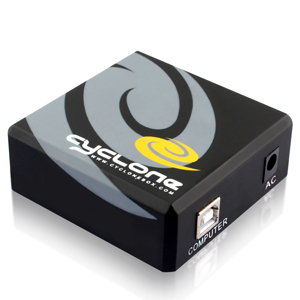
CycloneBox SL3 Server Update (2011-01-13)
CylconeBox server is updated, we decreased post-processing SL3
COD file time. Now, after upload COD file, you should get Level 7
code shortly after 20-30 seconds (up to 1-2 mins)
I think this will help for many ppls as I see more and more COD
files being uploaded every day
NOTE
This is server-side update,so no need to download any thing.
Stay tuned
Best Regards,
Cyclone Team
Feb 27, 2011
Z3X Siemens Benq Tool

Properties:
-Supported: EF81 , SXG75 , SG75 , SL91 (*) M7(*)
-New and very simple interface
-Comfortable choice of models
-Show of information about a necessary cable (*)
-Single-file flashes
-Working with COM and USB cables
-Load of news from a server about updates versions and plans
-Unlocking Support: Direct Unlock including SP, NET and User Lock (First in the world public solution. Thanks to ViperBJK from modopo )
-Safe Flashing. Software bypass boot erasing, so you cannot kill phone anymore
-Reading BRT(NVM), Repair BRT(NVM) by USB (No need to rename *.brt files and play with 3GSwup)
-Easy and fast NVM recovery
-Repair any programm brokes
-Deactivate "Factory Test Mode"
-Repair Network faults(*)
New mobileEx_setup_v3.4_rev1.8(20110109)
v3.4 revision 1.8, Public-Release
- MAIN
Added, Credit Convertion Dialog on 'Check Credit' (you can convert for FREE your DCT4 credits and BB5 credits into SL3 credits)
- NK
Added, XGOLD213 devices(RM-607,RM-608,RM-643,RM-644 etc) usb flashing support (dead/alive) [WF]
Added, XGOLD101,XGOLD110 IMEI backup/restore
Added, XGOLD101,XGOLD110 IMEI auto backup on safeflash
Added, Battery voltage information during scan phone in usb mode
Added, Use Dictionary option for GPU bruteforcer(using salt.dic as salt sequence)
Fixed, GPU bruteforcer hang at 99% if random salt is selected
Fixed, Phone Generation filtering
Fixed, Error read/write bug on usb flashing process
Improved Features compability between usb/flasher interface
Improved Broadcomm Usb Flashing
Automated XGOLD phone detection
Revised XGOLD flashing protocol
Download...
mobileEx_setup_v3.4_rev1.8(20110109).exe
- MAIN
Added, Credit Convertion Dialog on 'Check Credit' (you can convert for FREE your DCT4 credits and BB5 credits into SL3 credits)
- NK
Added, XGOLD213 devices(RM-607,RM-608,RM-643,RM-644 etc) usb flashing support (dead/alive) [WF]
Added, XGOLD101,XGOLD110 IMEI backup/restore
Added, XGOLD101,XGOLD110 IMEI auto backup on safeflash
Added, Battery voltage information during scan phone in usb mode
Added, Use Dictionary option for GPU bruteforcer(using salt.dic as salt sequence)
Fixed, GPU bruteforcer hang at 99% if random salt is selected
Fixed, Phone Generation filtering
Fixed, Error read/write bug on usb flashing process
Improved Features compability between usb/flasher interface
Improved Broadcomm Usb Flashing
Automated XGOLD phone detection
Revised XGOLD flashing protocol
Download...
mobileEx_setup_v3.4_rev1.8(20110109).exe
Feb 21, 2011
Flash File MCN Box
Some of my collection, updated :
MTK 6225 Flashes on Hotfile.com
MTK 6226 Flashes on Hotfile.com
MTK 6235 Flashes on Hotfile.com
more...
download link here...
http://forum.gsmhosting.com..
MTK 6225 Flashes on Hotfile.com
MTK 6226 Flashes on Hotfile.com
MTK 6235 Flashes on Hotfile.com
more...
download link here...
http://forum.gsmhosting.com..
JAF repair solution tested 100%
JAF repair solution tested 100%
New Solution Repair box JAF without resisters 330 and without remove chip LVC244A
Step 1: You have to find a stem LPT port cable as shown:
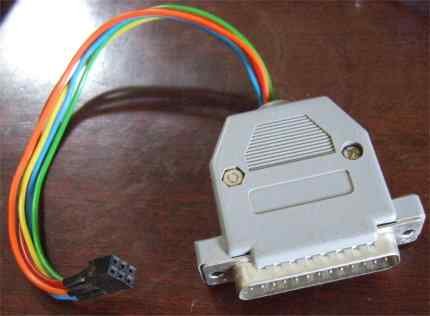
Just like on the Jack LPT port to attach to the back of the computer.
And on what it has stated that Jack LPT number from 1 to 25 feet (see wealth in'll see). And we only care about 4 feet.
Pin 6( called SCK)
Pin 7( called Mosi)
Pin 9( called reset)
Pin10( called miso)
As shown below:

Step 2: Open Box JAF and welding as Figure 1 below.

Step 3: View behind JAF BOX. using a scalpel and cut as shown in Figure 3 below.

Step 4: Connect the USB for the JAF Box to use GND and 5V Voltage
Step 5: Download: soft + Firmware of JAF box
RapidShare: 1-CLICK Web hosting - Easy Filehosting
Step 6: Install PonyProg_V207c
Step 7: After installation is complete, we set up as shown below.

Tested by ME and work 1000000%
Successfully Flash Dead Phones or Normal Phones With USB Cable
HERE IS FLASH LOG FOR NEW NOKIA 3120 CLASSIC RM-364 FLASHED VIA DEAD USB
METHOD :
JAF version 1.98.51
Detected PKEY: vmin81
Card life counter: 79.63%
P-key nokia module version 01.02
Detected JAF INTERFACE version: 01.B0, Driver version: 40000, Library version: 30107
JAF DCT4/BB5 LOADERS DIR: C:\Program Files\ODEON\JAF\Flash\
JAF DCT4/BB5 PRODUCT DIR: D:\UFS_DCTx\Products\
JAF USB LOADERS DIR: C:\Program Files\ODEON\JAF\FlashUSB\
JAF DCT3/DCTL LOADERS DIR: C:\Program Files\ODEON\JAF\Flash3\
Phone Type:
FILES SET FOR FLASHING:
MCU Flash file: C:\Documents and Settings\xx\Desktop\Israel\rm364__06.20.mcusw
PPM Flash file: C:\Documents and Settings\xx\Desktop\Israel\rm364__06.20.ppm_f
CNT Flash file: C:\Documents and Settings\xx\Desktop\Israel\rm364__06.20_ISM_004.im age_f_graphite
APE Variant file: NONE
PRESS POWER ON THE PHONE NOW!!!
Searching for phone...Detected P-KEY: vmin81
P-key nokia module version 01.02
Init usb communication...
Found
Starting DEAD USB phone flashing...
Using 06.02.002
Elf2flash 07.14.000
CMT RAW loader...
Patching RAW boot step1...
Patching RAW boot step2...
Patching RAW boot step3...
Sending RAW Loader...
...................Loader Sent!
Stage 2 starting.......................................... ...................................Loader Sent!
Stage 3 starting..................Phone prepared OK!
Waiting for the phone to boot...
Searching phone...Found!
Status byte: 80
Phone is in flash mode...
CMT blocks: 2180, APE blocks: 0
Erasing cmt...
Send CMT CFG...
Processing C:\Documents and Settings\ebrahim\Desktop\Israel\rm364__06.20.mcusw ...
Erasing cmt zone 00000000 - 0001FFFF ... Erase result: 0000
Erasing cmt zone 00040000 - 000BFFFF ... Erase result: 0000
Erasing cmt zone 000C0000 - 0013FFFF ... Erase result: 0000
Erasing cmt zone 01480000 - 015FFFFF ... Erase result: 0000
Erasing cmt zone 00140000 - 0147FFFF ... Erase result: 0000
Processing C:\Documents and Settings\ebrahim\Desktop\Israel\rm364__06.20.ppm_f ...
Erasing cmt zone 01600000 - 01CBFFFF ... Erase result: 0000
Processing C:\Documents and Settings\ebrahim\Desktop\Israel\rm364__06.20_ISM_0 04.image_f_graphite...
Erasing cmt zone 01FC0000 - 03F9FFFF ... Erase result: 0000
Erasing cmt zone 01CC0000 - 01FBFFFF ... Erase result: 0000
Writing cmt...
Processing C:\Documents and Settings\ebrahim\Desktop\Israel\rm364__06.20.mcusw ...
Sending CMT HASH for NOLO
Sending CMT HASH for KEYS
Sending CMT HASH for PRIMAPP
Sending CMT HASH for PASUBTOC
cmt->PAPUB_CERTIFICATE_DATA_BB5 block detected
cmt->PAPUB_CERTIFICATE_DATA_BB5 block detected, sending...
cmt->PAPUB keys already sent...
Sending CMT HASH for UPDAPP
Sending CMT HASH for DSP0
Sending CMT HASH for MCUSW
Processing C:\Documents and Settings\xx\Desktop\Israel\rm364__06.20.ppm_f...
Processing C:\Documents and Settings\xx\Desktop\Israel\rm364__06.20_ISM_004.im age_f_graphite...
Rebooting...
Finishing CMT session...
Restarting CMT...
Pooling phone...
MCUSW: V 06.20
29-02-08
RM-364
(c) Nokia
APESW: (null)
VariantSW: (null)
Prodcode: 0559082
Setting test mode...
Setting FULL FACTORY...
Operation took 0 minutes 0 seconds...
Done!
DCT4/BB5 counter: 376
Done!
HERE IS THE FLASH LOG FOR NOKIA 3500 CLASSIC :
JAF version 1.98.47
Detected PKEY: VMIN81
Card life counter: 69.86%
P-key nokia module version 01.01
Detected JAF INTERFACE version: 01.B0, Driver version: 40000, Library version: 30107
JAF DCT4/BB5 LOADERS DIR: C:\Program Files\ODEON\JAF\Flash\
JAF DCT4/BB5 PRODUCT DIR: D:\UFS_DCTx\Products\
JAF USB LOADERS DIR: C:\Program Files\ODEON\JAF\FlashUSB\
JAF DCT3/DCTL LOADERS DIR: C:\Program Files\ODEON\JAF\Flash3\
Changing mode...Done!
FILES SET FOR FLASHING:
MCU Flash file: C:\Documents and Settings\ebrahim\Desktop\3500c 5.51\rm272__05.51.mcusw
PPM Flash file: C:\Documents and Settings\ebrahim\Desktop\3500c 5.51\rm272__05.51.ppm_mea1
CNT Flash file: C:\Documents and Settings\ebrahim\Desktop\3500c 5.51\rm272__05.51.image_mea1_pink
APE Variant file: NONE
PRESS POWER ON THE PHONE NOW!!!
Searching for phone...Detected P-KEY: VMIN81
P-key nokia module version 01.01
Init usb communication...
Found
Starting DEAD USB phone flashing...
Using 06.02.002
Elf2flash 02.33.000 RAW loader...
Patching RAW boot step1...
Patching RAW boot step3...
Sending RAW Loader...
...................Loader Sent!
Stage 2 starting.......................................... .....................Loader Sent!
Stage 3 starting..................Phone prepared OK!
Waiting for the phone to boot...
Searching phone...Found!
Status byte: 04
Phone is in flash mode...
CMT blocks: 1422, APE blocks: 0
Erasing cmt...
Send CMT CFG...
Processing C:\Documents and Settings\ebrahim\Desktop\3500c 5.51\rm272__05.51.mcusw...
Erasing cmt zone 00000000 - 000006BF ...
Erasing cmt zone 000006C0 - 0001FFFF ...
Erasing cmt zone 00020000 - 0007FFFF ...
Erasing cmt zone 00080000 - 000DFFFF ...
Erasing cmt zone 00100000 - 001FFFFF ...
Erasing cmt zone 00200000 - 0031FFFF ...
Erasing cmt zone 00320000 - 0105FFFF ...
Erasing cmt zone 01060000 - 01067FFF ...
Erasing cmt zone 01068000 - 0107FFFF ...
Processing C:\Documents and Settings\ebrahim\Desktop\3500c 5.51\rm272__05.51.ppm_mea1...
Erasing cmt zone 01080000 - 0151FFFF ...
Processing C:\Documents and Settings\ebrahim\Desktop\3500c 5.51\rm272__05.51.image_mea1_pink...
Erasing cmt zone 01520000 - 01FDFFFF ...
Writing cmt...
Processing C:\Documents and Settings\ebrahim\Desktop\3500c 5.51\rm272__05.51.mcusw...
Sending CMT HASH for NOLO
Sending CMT HASH for KEYS
Sending CMT HASH for PRIMAPP
Sending CMT HASH for PASUBTOC
cmt->PAPUB_CERTIFICATE_DATA_BB5 block detected
cmt->PAPUB_CERTIFICATE_DATA_BB5 block detected
cmt->PAPUB_CERTIFICATE_DATA_BB5 block detected, sending...
cmt->PAPUB keys already sent...
Sending CMT HASH for UPDAPP
Sending CMT HASH for DSP0
Sending CMT HASH for MCUSW
Sending CMT HASH for PMM_CONF
Sending CMT HASH for SBIF_CONF
Processing C:\Documents and Settings\ebrahim\Desktop\3500c 5.51\rm272__05.51.ppm_mea1...
Processing C:\Documents and Settings\ebrahim\Desktop\3500c 5.51\rm272__05.51.image_mea1_pink...
Rebooting...
Restarting CMT...
Pooling phone...
MCUSW: V 05.51
06-09-07
RM-272
(c) Nokia.
APESW: (null)
VariantSW: (null)
Prodcode: 0549240
Setting test mode...
Setting FULL FACTORY...
Operation took 0 minutes 1 seconds...
Done!
DCT4/BB5 counter: 343
Done!
and more..
check link here...
http://forum.gsmhosting.com
METHOD :
JAF version 1.98.51
Detected PKEY: vmin81
Card life counter: 79.63%
P-key nokia module version 01.02
Detected JAF INTERFACE version: 01.B0, Driver version: 40000, Library version: 30107
JAF DCT4/BB5 LOADERS DIR: C:\Program Files\ODEON\JAF\Flash\
JAF DCT4/BB5 PRODUCT DIR: D:\UFS_DCTx\Products\
JAF USB LOADERS DIR: C:\Program Files\ODEON\JAF\FlashUSB\
JAF DCT3/DCTL LOADERS DIR: C:\Program Files\ODEON\JAF\Flash3\
Phone Type:
FILES SET FOR FLASHING:
MCU Flash file: C:\Documents and Settings\xx\Desktop\Israel\rm364__06.20.mcusw
PPM Flash file: C:\Documents and Settings\xx\Desktop\Israel\rm364__06.20.ppm_f
CNT Flash file: C:\Documents and Settings\xx\Desktop\Israel\rm364__06.20_ISM_004.im age_f_graphite
APE Variant file: NONE
PRESS POWER ON THE PHONE NOW!!!
Searching for phone...Detected P-KEY: vmin81
P-key nokia module version 01.02
Init usb communication...
Found
Starting DEAD USB phone flashing...
Using 06.02.002
Elf2flash 07.14.000
CMT RAW loader...
Patching RAW boot step1...
Patching RAW boot step2...
Patching RAW boot step3...
Sending RAW Loader...
...................Loader Sent!
Stage 2 starting.......................................... ...................................Loader Sent!
Stage 3 starting..................Phone prepared OK!
Waiting for the phone to boot...
Searching phone...Found!
Status byte: 80
Phone is in flash mode...
CMT blocks: 2180, APE blocks: 0
Erasing cmt...
Send CMT CFG...
Processing C:\Documents and Settings\ebrahim\Desktop\Israel\rm364__06.20.mcusw ...
Erasing cmt zone 00000000 - 0001FFFF ... Erase result: 0000
Erasing cmt zone 00040000 - 000BFFFF ... Erase result: 0000
Erasing cmt zone 000C0000 - 0013FFFF ... Erase result: 0000
Erasing cmt zone 01480000 - 015FFFFF ... Erase result: 0000
Erasing cmt zone 00140000 - 0147FFFF ... Erase result: 0000
Processing C:\Documents and Settings\ebrahim\Desktop\Israel\rm364__06.20.ppm_f ...
Erasing cmt zone 01600000 - 01CBFFFF ... Erase result: 0000
Processing C:\Documents and Settings\ebrahim\Desktop\Israel\rm364__06.20_ISM_0 04.image_f_graphite...
Erasing cmt zone 01FC0000 - 03F9FFFF ... Erase result: 0000
Erasing cmt zone 01CC0000 - 01FBFFFF ... Erase result: 0000
Writing cmt...
Processing C:\Documents and Settings\ebrahim\Desktop\Israel\rm364__06.20.mcusw ...
Sending CMT HASH for NOLO
Sending CMT HASH for KEYS
Sending CMT HASH for PRIMAPP
Sending CMT HASH for PASUBTOC
cmt->PAPUB_CERTIFICATE_DATA_BB5 block detected
cmt->PAPUB_CERTIFICATE_DATA_BB5 block detected, sending...
cmt->PAPUB keys already sent...
Sending CMT HASH for UPDAPP
Sending CMT HASH for DSP0
Sending CMT HASH for MCUSW
Processing C:\Documents and Settings\xx\Desktop\Israel\rm364__06.20.ppm_f...
Processing C:\Documents and Settings\xx\Desktop\Israel\rm364__06.20_ISM_004.im age_f_graphite...
Rebooting...
Finishing CMT session...
Restarting CMT...
Pooling phone...
MCUSW: V 06.20
29-02-08
RM-364
(c) Nokia
APESW: (null)
VariantSW: (null)
Prodcode: 0559082
Setting test mode...
Setting FULL FACTORY...
Operation took 0 minutes 0 seconds...
Done!
DCT4/BB5 counter: 376
Done!
HERE IS THE FLASH LOG FOR NOKIA 3500 CLASSIC :
JAF version 1.98.47
Detected PKEY: VMIN81
Card life counter: 69.86%
P-key nokia module version 01.01
Detected JAF INTERFACE version: 01.B0, Driver version: 40000, Library version: 30107
JAF DCT4/BB5 LOADERS DIR: C:\Program Files\ODEON\JAF\Flash\
JAF DCT4/BB5 PRODUCT DIR: D:\UFS_DCTx\Products\
JAF USB LOADERS DIR: C:\Program Files\ODEON\JAF\FlashUSB\
JAF DCT3/DCTL LOADERS DIR: C:\Program Files\ODEON\JAF\Flash3\
Changing mode...Done!
FILES SET FOR FLASHING:
MCU Flash file: C:\Documents and Settings\ebrahim\Desktop\3500c 5.51\rm272__05.51.mcusw
PPM Flash file: C:\Documents and Settings\ebrahim\Desktop\3500c 5.51\rm272__05.51.ppm_mea1
CNT Flash file: C:\Documents and Settings\ebrahim\Desktop\3500c 5.51\rm272__05.51.image_mea1_pink
APE Variant file: NONE
PRESS POWER ON THE PHONE NOW!!!
Searching for phone...Detected P-KEY: VMIN81
P-key nokia module version 01.01
Init usb communication...
Found
Starting DEAD USB phone flashing...
Using 06.02.002
Elf2flash 02.33.000 RAW loader...
Patching RAW boot step1...
Patching RAW boot step3...
Sending RAW Loader...
...................Loader Sent!
Stage 2 starting.......................................... .....................Loader Sent!
Stage 3 starting..................Phone prepared OK!
Waiting for the phone to boot...
Searching phone...Found!
Status byte: 04
Phone is in flash mode...
CMT blocks: 1422, APE blocks: 0
Erasing cmt...
Send CMT CFG...
Processing C:\Documents and Settings\ebrahim\Desktop\3500c 5.51\rm272__05.51.mcusw...
Erasing cmt zone 00000000 - 000006BF ...
Erasing cmt zone 000006C0 - 0001FFFF ...
Erasing cmt zone 00020000 - 0007FFFF ...
Erasing cmt zone 00080000 - 000DFFFF ...
Erasing cmt zone 00100000 - 001FFFFF ...
Erasing cmt zone 00200000 - 0031FFFF ...
Erasing cmt zone 00320000 - 0105FFFF ...
Erasing cmt zone 01060000 - 01067FFF ...
Erasing cmt zone 01068000 - 0107FFFF ...
Processing C:\Documents and Settings\ebrahim\Desktop\3500c 5.51\rm272__05.51.ppm_mea1...
Erasing cmt zone 01080000 - 0151FFFF ...
Processing C:\Documents and Settings\ebrahim\Desktop\3500c 5.51\rm272__05.51.image_mea1_pink...
Erasing cmt zone 01520000 - 01FDFFFF ...
Writing cmt...
Processing C:\Documents and Settings\ebrahim\Desktop\3500c 5.51\rm272__05.51.mcusw...
Sending CMT HASH for NOLO
Sending CMT HASH for KEYS
Sending CMT HASH for PRIMAPP
Sending CMT HASH for PASUBTOC
cmt->PAPUB_CERTIFICATE_DATA_BB5 block detected
cmt->PAPUB_CERTIFICATE_DATA_BB5 block detected
cmt->PAPUB_CERTIFICATE_DATA_BB5 block detected, sending...
cmt->PAPUB keys already sent...
Sending CMT HASH for UPDAPP
Sending CMT HASH for DSP0
Sending CMT HASH for MCUSW
Sending CMT HASH for PMM_CONF
Sending CMT HASH for SBIF_CONF
Processing C:\Documents and Settings\ebrahim\Desktop\3500c 5.51\rm272__05.51.ppm_mea1...
Processing C:\Documents and Settings\ebrahim\Desktop\3500c 5.51\rm272__05.51.image_mea1_pink...
Rebooting...
Restarting CMT...
Pooling phone...
MCUSW: V 05.51
06-09-07
RM-272
(c) Nokia.
APESW: (null)
VariantSW: (null)
Prodcode: 0549240
Setting test mode...
Setting FULL FACTORY...
Operation took 0 minutes 1 seconds...
Done!
DCT4/BB5 counter: 343
Done!
and more..
check link here...
http://forum.gsmhosting.com
BB5 NO TP UNLOCKER for THOMAS PKEY TEST REPORT HERE

Here is the soon to be released
FREE BB5 NO TP UNLOCKER for THOMAS PKEY OWNERS ONLY

FREE BB5 NO TP UNLOCKER for THOMAS PKEY HOLDER ONLY
Thomas PKEY BB5 Unlocker v.103
=======================
Features :
- Free to all THOMAS PKEY
Most well know thing of gsm
-BB5 unlocker without TP
-it can repair Config:FFFFFFFFFF
-it can repair Config:0000000000
-And most important . it requires internet conection
DOWNLOAD HERE
http://www.jafsupport.com/files/Jafsupport%20v1.03.rar
Feb 11, 2011
Tutorial Mkey
- Mkey_HWU_E1752_Unlock_NCK-calculate_WriteNVM.avi
- Mkey_HWU_E220_ReadNCK.avi
- Mkey_HWU_E220_WriteNVM.avi
- Mkey_ZTE_MF100_Repair-IMEI_WithOut_Jtag!!!.avi
- Mkey_ZTE_MF100_WriteNVM.avi
- Mkey_ZTE_MF112_Unlock.avi
- Mkey_ZTE_MF180_BLN_RU_B03_Unlock.avi
- SmartFlasher_video-manual.exe
- Unlock_MF100_BLN_B03.avi
- Unlock_MF100_BLN_B03.exe
- Unlock_MF100_BLN_B03.rar

Feb 10, 2011
Pocket PC Appz & Games
Pocket PC Appz & Games
Check Link Here..
http://forum.gsmhosting.com/vbb/f98/pocket-pc-appz-games-197462/
Check Link Here..
http://forum.gsmhosting.com/vbb/f98/pocket-pc-appz-games-197462/
All HTC Roms Download
All HTC Roms Download
Magician
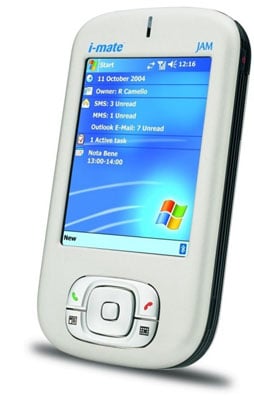
also Known as
Qtek S100 / Qtek S110 / Dopod 818 / O2 Xda II Mini / T-Mobile MDA Compact / i-mate JAM / i-mate JAM (Limited Charcoal Edition)
World Wide English UK
World Wide English USA
Arabic
Italian
French
Spanish
German
Magician
also Known as
Qtek S100 / Qtek S110 / Dopod 818 / O2 Xda II Mini / T-Mobile MDA Compact / i-mate JAM / i-mate JAM (Limited Charcoal Edition)
World Wide English UK
World Wide English USA
Arabic
Italian
French
Spanish
German
Feb 9, 2011
could not start the camera. close othere application and try opening the camera again
Solution :
100000000% camera problem just change your camera properly and
post result tested meny times by me.
100000000% camera problem just change your camera properly and
post result tested meny times by me.
unlock iphone 3g & 3gs 04.26.08 thru 05.13.04 no wifi method
procedure
1.baseband must be 04.26.08 thru 05.13.04
2.jailbroken
3.afc2add must present to avoid error or just jailbreak using redsn0w ( latest release is
in beta ver. it may affect the unlock process) so use at your own risk..
4.download my software here Free File Hosting Made Simple - MediaFire
5.tick unlock
6.reboot twice ( 2times) ..done!
much better if you apply 3.1.3 fw version and redsnow 0.9.4 jailbreak
coz ios4.0 fw and redsn0w 0.9.5b5-3 are both buggy as of now..
100% tested and ok..
credits to dev-team
thanks

1.baseband must be 04.26.08 thru 05.13.04
2.jailbroken
3.afc2add must present to avoid error or just jailbreak using redsn0w ( latest release is
in beta ver. it may affect the unlock process) so use at your own risk..
4.download my software here Free File Hosting Made Simple - MediaFire
5.tick unlock
6.reboot twice ( 2times) ..done!
much better if you apply 3.1.3 fw version and redsnow 0.9.4 jailbreak
coz ios4.0 fw and redsn0w 0.9.5b5-3 are both buggy as of now..
100% tested and ok..
credits to dev-team
thanks
how to jailbreak iphone 4s dont have orignal carrer sim card
1. Download Absinthe
2. Run Absinthe
3. After connecting your device to your PC via USB, simply open the Absinthe jailbreak tool. It should detect your device and give you the option of jailbreaking it.
Press “jailbreak” to begin the process. It should take you through several steps.
The next stage of the process will make it appear that your device restoring from a backup:
Next your device will start to rebootAfter rebooting, it will “send payload data” (remember that this is all happening without any additional input from you):
Finally, you’ll get this “almost done” screen:
Though it says to look for a “jailbreak” icon on your device’s home screen, the icon is actually called Absinthe
Your device should then reboot, and return with a Cydia icon in its place. You’re jailbroken!
BUT YOU NEED TO ACTIVATE FIRST YOUR PHONE..
JAILBREAKING WILL NOT SOLVE YOUR PROBLEM ABOUT ACTIVATING..
YOU REALLY NEED THE ORIGINAL CARRIER SIM..
2. Run Absinthe
3. After connecting your device to your PC via USB, simply open the Absinthe jailbreak tool. It should detect your device and give you the option of jailbreaking it.
Press “jailbreak” to begin the process. It should take you through several steps.
The next stage of the process will make it appear that your device restoring from a backup:
Next your device will start to rebootAfter rebooting, it will “send payload data” (remember that this is all happening without any additional input from you):
Finally, you’ll get this “almost done” screen:
Though it says to look for a “jailbreak” icon on your device’s home screen, the icon is actually called Absinthe
Your device should then reboot, and return with a Cydia icon in its place. You’re jailbroken!
BUT YOU NEED TO ACTIVATE FIRST YOUR PHONE..
JAILBREAKING WILL NOT SOLVE YOUR PROBLEM ABOUT ACTIVATING..
YOU REALLY NEED THE ORIGINAL CARRIER SIM..
Feb 8, 2011

Download China Mobiles Flash Files By Version
M320_BOOTLOADER_V005_MT6228_M320V10_07_12_V1_3T06D 070810
download
http://www.4shared.com/file/10568328...06D070810.html
More Flash Files...
Check Link Here..
http://forum.gsmhosting.com
download
http://www.4shared.com/file/10568328...06D070810.html
More Flash Files...
Check Link Here..
http://forum.gsmhosting.com
All China Flash File MTK, Infineon & Spread One Thread
Maximus C85 (Infineon7880)

Maximus C85
More Flash Files...
check link here...
http://forum.gsmhosting.com
Maximus C85
More Flash Files...
check link here...
http://forum.gsmhosting.com


Blackberry Connect Desktop for Windows Mobile
Blackberry connect Desktop is software which can be used to connect any smartphone using a pocket PC OS such as a HTC phone or other smartphone. So with other words: blackberry connect can be used to receive blackberry data on non-blackberry hardware. This software is the desktop side installation.
The download includes Blackberry Connect Professional version 4.0.0.84
Android Phones - Hard Reset
Please post here only Hard Reset of Android Phones
No question or how to please.
Help me to keep this thread clean
A big thanks to www.hard-reset.eu for their resource
"Performing a factory data reset deletes all data, including downloaded applications, and resets the device back to its initial state—the state before you turned on the device for the first time.
Important Make sure to back up important data you have on the device before you perform a factory data reset."
HTC Dream
1. Turn the G1 off. If it’s frozen on, take the battery out and put it back in the unit.
2. Hold the Home and Power keys down at same time for about 25 seconds. You will see a yellow triangle screen with exclamation point in the
middle.
Now to wipe the device clean:
3. Press Alt+L.
4. Press Alt+W for a factory reset.
5. Press the Home and Back keys again for about 25 seconds.
The device should then reset again and the hard reset is complete.
++++++++++++++++++++++++++++++++++++++++++++++++++
HTC Magic
1. With the phone turned off, press and hold the HOME and BACK
2. Briefly press the END CALL/POWER button while continuing to pressHOME and BACK buttons.
3. When you see the screen with the 3 Android images, release the HOME and BACK buttons, and then press the TRACKBALL.
Tip : If your phone hangs or freezes, remove the battery then wait for a few seconds, and then re-install it. After re-installing the battery, turn on the phone.

++++++++++++++++++++++++++++++++++++++++++++++++++
HTC Hero
1. With the phone turned off, press and hold the HOME and BACKand then briefly press the END CALL/POWER button. The reset process will start after a few seconds.
2. Wait for the phone to finish the reset process and then press MENU.
Tip : If your phone hangs or freezes, remove the battery then wait for a few seconds, and then re-install it. After re-installing the battery, turn on the phone.
++++++++++++++++++++++++++++++++++++++++++++++++++
HTC Tattoo
1. With the phone turned off, press and hold the HOME and BACKand then briefly press the END CALL/POWER button.
2. Press the ENTER button to begin the reset process.
Tip If your phone hangs or freezes, remove the battery then wait for a few seconds, and then re-install it. After re-installing the battery, turn on the phone.
++++++++++++++++++++++++++++++++++++++++++++++++++
HTC Desire : reserved
++++++++++++++++++++++++++++++++++++++++++++++++++
HTC Whitestone : reserved
Motorola Droid
To reset your phone to factory settings and erase all the data on your phone,
Touch Menu > Settings
> Privacy > Factory data reset > Reset phone.
Warning: All data on your phone will be deleted.
Motorola Droid Hard reset with keys
Power off device.
Press X key on hard keyboard + power button, then release both buttons.
When you see exclamation point press and hold VOLUME UP + CAMERA KEY. You will see Android system recovery menu.
With D pad go to data / factory reset, then press CENTER D Pad, then choose Yes.
++++++++++++++++++++++++++++++++++++++++++++++++++
Motorola Dext : Reserved
++++++++++++++++++++++++++++++++++++++++++++++++++
LG GW620 [Eve] Hard Reset
To do a hard reset or data reset in LG GW620 aka EVE
Enter using Dial pad
3845#*620#
From menu select factory reset or whatever you want.
++++++++++++++++++++++++++++++++++++++++++++++++++
HTC Dream Soft reset
A soft reset clears the device memory and closes running applications. Perform a soft reset when your device hangs or freezes, is running slower than normal, or an application is not performing properly. If a soft reset is performed when applications are running, unsaved information will be lost.
To perform a soft reset
1. Remove the back cover.
2. Remove the battery for a few seconds.
3. Re-install the battery, replace the back cover, then turn on the device
To remove the back cover
1. Make sure the device is turned off.
2. Hold the device sideways with the control buttons on the right.
3. Slide the screen panel up to reveal the keyboard and the back cover release tab.
4. Gently push down the release tab with your finger until the back cover disengages from the device.
5. Pull the back cover out then set it aside.
Motorola Dext
factory reset
1. Holding the Camera button while turning on your phone,
2. When prompted hit the Volume-Down rocker button to go into Recovery Mode.
3. After you get into Recovery Mode,
4. Press ALT+L to reset, then Menu+Back to reboot.
No question or how to please.
Help me to keep this thread clean
A big thanks to www.hard-reset.eu for their resource
"Performing a factory data reset deletes all data, including downloaded applications, and resets the device back to its initial state—the state before you turned on the device for the first time.
Important Make sure to back up important data you have on the device before you perform a factory data reset."
HTC Dream
1. Turn the G1 off. If it’s frozen on, take the battery out and put it back in the unit.
2. Hold the Home and Power keys down at same time for about 25 seconds. You will see a yellow triangle screen with exclamation point in the
middle.
Now to wipe the device clean:
3. Press Alt+L.
4. Press Alt+W for a factory reset.
5. Press the Home and Back keys again for about 25 seconds.
The device should then reset again and the hard reset is complete.
++++++++++++++++++++++++++++++++++++++++++++++++++
1. With the phone turned off, press and hold the HOME and BACK
2. Briefly press the END CALL/POWER button while continuing to pressHOME and BACK buttons.
3. When you see the screen with the 3 Android images, release the HOME and BACK buttons, and then press the TRACKBALL.
Tip : If your phone hangs or freezes, remove the battery then wait for a few seconds, and then re-install it. After re-installing the battery, turn on the phone.
++++++++++++++++++++++++++++++++++++++++++++++++++
HTC Hero
1. With the phone turned off, press and hold the HOME and BACKand then briefly press the END CALL/POWER button. The reset process will start after a few seconds.
2. Wait for the phone to finish the reset process and then press MENU.
Tip : If your phone hangs or freezes, remove the battery then wait for a few seconds, and then re-install it. After re-installing the battery, turn on the phone.
++++++++++++++++++++++++++++++++++++++++++++++++++
HTC Tattoo
1. With the phone turned off, press and hold the HOME and BACKand then briefly press the END CALL/POWER button.
2. Press the ENTER button to begin the reset process.
Tip If your phone hangs or freezes, remove the battery then wait for a few seconds, and then re-install it. After re-installing the battery, turn on the phone.
++++++++++++++++++++++++++++++++++++++++++++++++++
HTC Desire : reserved
++++++++++++++++++++++++++++++++++++++++++++++++++
HTC Whitestone : reserved
Motorola Droid
To reset your phone to factory settings and erase all the data on your phone,
Touch Menu > Settings
> Privacy > Factory data reset > Reset phone.
Warning: All data on your phone will be deleted.
Motorola Droid Hard reset with keys
Power off device.
Press X key on hard keyboard + power button, then release both buttons.
With D pad go to data / factory reset, then press CENTER D Pad, then choose Yes.
++++++++++++++++++++++++++++++++++++++++++++++++++
Motorola Dext : Reserved
++++++++++++++++++++++++++++++++++++++++++++++++++
LG GW620 [Eve] Hard Reset
To do a hard reset or data reset in LG GW620 aka EVE
Enter using Dial pad
3845#*620#
From menu select factory reset or whatever you want.
++++++++++++++++++++++++++++++++++++++++++++++++++
HTC Dream Soft reset
A soft reset clears the device memory and closes running applications. Perform a soft reset when your device hangs or freezes, is running slower than normal, or an application is not performing properly. If a soft reset is performed when applications are running, unsaved information will be lost.
To perform a soft reset
1. Remove the back cover.
2. Remove the battery for a few seconds.
3. Re-install the battery, replace the back cover, then turn on the device
To remove the back cover
1. Make sure the device is turned off.
2. Hold the device sideways with the control buttons on the right.
3. Slide the screen panel up to reveal the keyboard and the back cover release tab.
4. Gently push down the release tab with your finger until the back cover disengages from the device.
5. Pull the back cover out then set it aside.
Motorola Dext
factory reset
1. Holding the Camera button while turning on your phone,
2. When prompted hit the Volume-Down rocker button to go into Recovery Mode.
3. After you get into Recovery Mode,
4. Press ALT+L to reset, then Menu+Back to reboot.
Feb 7, 2011
Nokia N8 Keys and parts User Guide
Discover the keys and parts in the device.
Keys and parts
Tip: Your N8 has a virtual keyboard. Tap the mode switching key * 1 to switch between letters and numbers.


Keypad Lock
With a touchscreen UI, many things are just a touch. To prevent accidental calls or other actions, it is good to the keys and lock the screen. Use the screen and keys using a lock switch on the side of the device.
Keys and parts
Tip: Your N8 has a virtual keyboard. Tap the mode switching key * 1 to switch between letters and numbers.
Keypad Lock
With a touchscreen UI, many things are just a touch. To prevent accidental calls or other actions, it is good to the keys and lock the screen. Use the screen and keys using a lock switch on the side of the device.
NOKIA 5030c Complete Solutions

NOKIA 5030c Complete Solutions
Check Link Here...
http://forum.gsmhosting.com/vbb/f148/coming-soon-all-solution-here-1123843/
Feb 5, 2011
Unlock iPhone 4 on iOS 4.2.1 / 1.59.00 Baseband after Jailbreak with Greenpois0n RC5 [How to Guide]
kNow you can update your iPhone 4 to iOS 4.2.1 with preserving 1.59.00 baseband, which means that you will be able to unlock your iPhone 4 with ultrasn0w 1.2. Let's check out the full step by step guide after the jump

STEP 1: Download TinyUmbrella from here.
STEP 2: Open TinyUmbrella then click on "Start TSS Server"
STEP 3: Open iTunes.
STEP 4: Now, Click on "Restore" NOT "Update"
STEP 5: Now you will get "Error 1013" which means that your baseband has been preserved.
STEP 6: Exit iTunes.
STEP 7: Now you have to jailbreak your iPhone 4 with the Greenpois0n RC5, follow our guide posted here.
STEP 8: Finally you can unlock your iPhone 4 running baseband 1.59.00 using Ultrasn0w 1.2, follow our guide posted here.
Note: this guide is only work with iPhone 4.
Feb 4, 2011
Untethered Jailbreak for iOS 4.2.1, GreenPois0n RC5
Finally greenpois0n and an untethered jailbreak for the iPad is available for iOS 4.2.1.
The best part about this jailbreak is that it is untethered jailbreak...NOW YOU CAN FINALLY reboot your iPad without having to jailbreak it again. With earlier jailbreaks, whenever you rebooted your iPad, it would go into DFU mode requiring another jailbreak it to refresh it.

For those that have been relying on ultrasn0w for a carrier unlock on the iPhone, you should hold off on this jailbreak as it will update your baseband and likely lock your iPhone.

Instructions to jailbreak your iPad, iPod Touch or iPhone...
Step 1: Download greenPois0n from this link.
Step 2: Connect your iPad with USB to your computer and click “Prepare to Jailbreak (DFU)”
Step 3: Follow the onscreen instructions to enter your iPad into DFU mode:
Step 5: Your iPad is now successfully jailbroken on iOS 4.2.1. Start “Loader” found on the homescreen to install Cydia. Be sure to check out the ThemeCenter and new manage account features in Cydia as well.
The best part about this jailbreak is that it is untethered jailbreak...NOW YOU CAN FINALLY reboot your iPad without having to jailbreak it again. With earlier jailbreaks, whenever you rebooted your iPad, it would go into DFU mode requiring another jailbreak it to refresh it.
For those that have been relying on ultrasn0w for a carrier unlock on the iPhone, you should hold off on this jailbreak as it will update your baseband and likely lock your iPhone.
Instructions to jailbreak your iPad, iPod Touch or iPhone...
Step 1: Download greenPois0n from this link.
Step 2: Connect your iPad with USB to your computer and click “Prepare to Jailbreak (DFU)”
Step 3: Follow the onscreen instructions to enter your iPad into DFU mode:
- Press and hold the sleep button (2 seconds)
- Continue holding sleep; press and hold home (10 seconds)
- Release sleep button; continue holding home (15 seconds)
Step 5: Your iPad is now successfully jailbroken on iOS 4.2.1. Start “Loader” found on the homescreen to install Cydia. Be sure to check out the ThemeCenter and new manage account features in Cydia as well.
iphone 4g mic not working
iphone 4g mic not working solutions...
1.YouTube - iPhone 4 MIC Problem solution Part 1 try this sollution.
2.u probleme is here....
ImageShack® - Online Photo and Video Hosting
3.http://www.youtube.com/watch?v=C-n1L...l::cool::cool:
1.YouTube - iPhone 4 MIC Problem solution Part 1 try this sollution.
2.u probleme is here....
ImageShack® - Online Photo and Video Hosting
3.http://www.youtube.com/watch?v=C-n1L...l::cool::cool:
iphone 3g screen back light
iphone 3g screen back light solutions..
1.Check Light Sensor Near Ear speaker If The Light Work When Power On The Iphone, If Not Check Lamp Lines.
2.The fix for iphone 3gs backlight is
here: iPhone 3GS No Backlight Fix
Should have a 3G one up soon.
Advanced soldering skills required!
thanks..
1.Check Light Sensor Near Ear speaker If The Light Work When Power On The Iphone, If Not Check Lamp Lines.
2.The fix for iphone 3gs backlight is
here: iPhone 3GS No Backlight Fix
Should have a 3G one up soon.
Advanced soldering skills required!
thanks..
I phone 4 no mic & earpeace
reball this ic on the figurer ( link bellow) ur problome will solve....
Pic Solutions Here...
gk aud.JPG - 4shared.com - photo sharing - download image
Pic Solutions Here...
gk aud.JPG - 4shared.com - photo sharing - download image
iPhone Hardware problems in one thread

SOLUTION: RESTORE TO LATEST FIRMWARE.... and ok
iPhone 3G Camera Replacement and Installation
Download link (Personal account):
http://kewlshare.com/dl/e33385045a22...mBOKI.exe.html
http://uploading.com/files/H6PAQZQ1/...mBOKI.exe.html

Jailbreak explanations
Jailbreak explanations
Many people jailbreak in order to change how their iPhone looks and feels. This is where you will need Winterboard. Winterboard is a free app and it can be found in Cydia. Winteboard is needed if you want to customize your wallpapers and themes. When you decide to install a specific theme, all parts of the theme will be in the Winterboard. In some themes you will be able to use only the complete theme but in others you will be able to choose elements of various themes (sounds from one theme, visual effects from other). If you seriously want to play with the appearance of your iPhone you should explore Winterboard carefully. Winterboard is immensely powerful tool for customizing your iPhones springboard.
Feb 3, 2011
Released Opera Mobile Browser for Android with Pinch and Zoom Features
Released Opera Mobile Browser for Android with Pinch and Zoom Features. Opera mobile browser for android is coming up on 9th of November. I just visited opera’s site they have announced the date for releasing opera browser for android. As you know that opera is one of the best browsers for Nokia’s set now they are enter in android world. Some of the feature of Opera mobile browser is given below
- full page view with pinch and zoom,
- Speed Dials,
- tabbed browsing,
- full screen,
- adjustable text size,
- saved pages for offline viewing

Feb 2, 2011


Sony Ericsson X10i Charging Solution-HOT
Use original usb cable and charger for this model only.
Phone might not work when using not original charger.

Phone might not work when using not original charger.
Subscribe to:
Posts (Atom)