Jan 30, 2012

unlock Gratis utk All type Blackberry,Support Blackberry Tourch 9800

http://magicgsm.com/product_images/g/823/blackberry_UNLOCK__68339_zoom.jpg
Solutions..
1.download mep code di

download..
Mep-reader.rar


2.jgn lp imei sm mep di cantumkan
3.cara masukin codenya,agan msk di:
Optoin-Advance Option-SIM Card-ketik mep2-masukin deh codenya.
iPhone 4S Users Planning on Unlocking Should Remain on iOS 5.0

Although multiple warnings have suggested that iPhone 4S users update to iOS 5.0.1 before it’s too late, a new report from iClarified claims that these users should actually remain on iOS 5.0 to ensure the greatest possibility of unlocking their device in the future, should they ever need to unlock.

The news came from MuscleNerd who confirmed that an untethered jailbreak for iPhone 4S running iOS 5 will be released soon after the iOS 5.0.1 jailbreak…

MuscleNerd has confirmed to iClarified that an untethered iPhone 4S jailbreak for iOS 5.0 will be released at the same time as the iOS 5.0.1 jailbreak, or a day or two later. As always, for those looking to unlock, it is standard operating procedure to stay at the lowest possible baseband.

For those that have already updated to iOS 5.0.1, however, it might not be too late.

iPhone 4S users running iOS 5.0.1 are recommended to downgrade their baseband from build number 9A406 to 9A405, since an unlocking method will most likely be found for the earlier build first.

While an iPhone 4S unlock is not guaranteed, iOS hacker MuscleNerd did make an announcement last November claiming that a very promising unlock was in the works for Apple’s latest handset. If an unlock is inevitably released, we’ll be quick to let you know.

[iClarified]

HTC Desire SIM-Unlock Utility

SIM-Unlock Utility v0.9.5


As being pointed out by more and more users regarding scamms, I have to clarify:

THIS APP IS FREEWARE! DO NOT TRUST ANY EBAY/WHATEVER-SITE SELLER!
If you've been asked money and you paid for it, try to get a refund by mailing both Ebay/Paypal/middleman and get them shut down.
This is the only site I endorse!
Commercial use is forbidden!


The summer holiday brought me some more time, so I decided to update the tool. The latest version works on Windows, takes ~30 seconds and the rate of success is greatly improved (we'll see about that.. ). Forget about iso and burning. This is still only for Desire (HTC Bravo),though..

Please note! By using the windows version of the app, you ar not required to boot your phone into HBOOT, it will take care of it by itself.


Old stuff (previous versions, linux only):
Burn the iso, boot it, power up your phone into HBOOT by pressing both Vol-Down and Power and follow the instructions.
Post your experiences here for further development. The app doesn't require root or s-off and should work on any hboot and radio version. (it has been tested so far with HBOOT up to 0.93.1000 and RADIO up to 5.14.05.17).
It's based on some vulnerabilities and undocumented features, so disclosing them would mean the greater the chance of them being corrected.
I've only tested it on Desire GSM and I do not recommend using it on CDMA devices; doing otherwise could lead to unpredictable results.

Download link:
Windows version: HTC_Desire_Unlock_v0.9.5.rar
Bootable linux cd (obsolete!): HTC_Desire_Unlock_v0.2a.iso


If you like free software and find this tool useful, Paypal me a beer, it helps development a lot..


Changelog:
v0.9.5 - beta version; added debugging info that help future updates; reads Sensation HT** unlock code; not tested, might not work at all..
v0.9.4 – better connectivity with the phone; I actually didn’t test it because my USB socket (phone side) has a hardware problem (due to multiple plug ins/outs) and allows only charging. If you test it and it works, please report back!
v0.9.2 - If you have problems connecting with the phone, simply boot your Desire in Hboot menu (Vol-Down + power), connect to computer via usb cable and wait for the menu title to change to HBOOT USB PLUG; only and only then should you start the app; it might work this way for some of you.
v0.9.1 - dealt with Unable to load function(s) error.
v0.9 - major changes; windows version; different approach;
v0.2a - trying to reduce the number of false positives; the phone should restart if everything's ok. If it doesn't, start over again until it does.

source
http://forum.xda-developers.com/showthread.php?t=943726

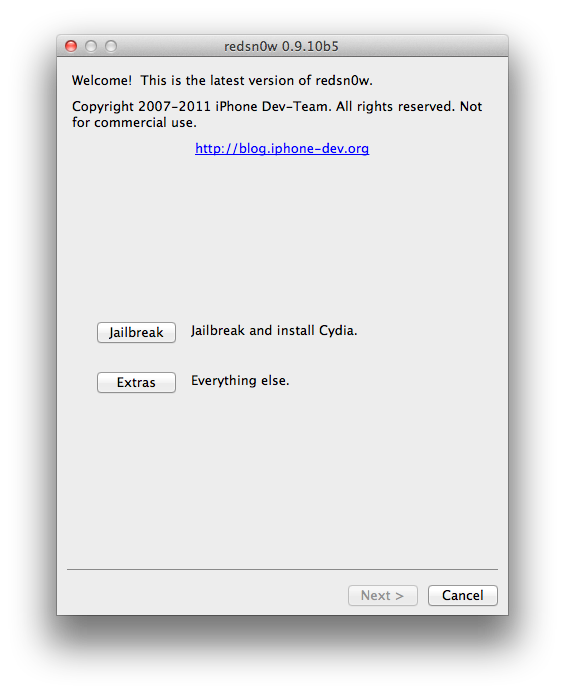
iPhone Dev-Team Releases RedSn0w 0.9.10b5 With iBooks Fix

The iPhone Dev-Team has released RedSn0w 0.9.10b5 which includes another fix for iBooks by planetbeing.

redsn0w version b5 incorporates yet another fix for iBooks, this time involving DRM. @planetbeing wrote a utility called "crazeles" that overcomes jailbreak detection by iBooks that would cause about 10% of images to show incorrectly. This fix is similar to the "hunnypot" fix that @comex wrote for the 4.x jailbreak. As usual, you can choose to install the fix either by re-running redsn0w over your existing jailbreak (de-select Cydia if you do that), or by installing the corona package from Cydia (it's the same set of files no matter which way you choose).

You can download the latest version of RedSn0w from here. You can find instructions on how to jailbreak your device here.

Read More

http://www.iclarified.com/entry/index.php?enid=19631

IPhone 4s Firmware Files

http://www.idgeeks.net/wp-content/uploads/2011/10/apple-iphone-4-911.jpeg

Download...
5.0.1 (4S): iPhone4,1_5.0.1_9A405_Restore.ipsw
5.0.1 (4S) [9A406]: iPhone4,1_5.0.1_9A406_Restore.ipsw


more..
http://www.iclarified.com/entry/index.php?enid=750

Jan 26, 2012

zZ-Key Nokia Update, zzNKtool v0.05b & zzConsoleBF2nCk Release

zZ-Key Nokia Update, zzNKtool v0.05b & zzConsoleBF2nCk Release

zzNKtool v0.05b
What New:
-----------------------------------------------
Added Rap3Gv4 Read Log for BF Supported via USB (All Rap3Gv4 Hashes supported).
Added Rap3Gv4 Repair Superdongle (All Rap3Gv4 Hashes supported).
Added Rap3Gv4 Sx4 Authorization (All Rap3Gv4 Hashes supported).


.... and more

zzConsoleBF2nCk Release
--------------------------------
BF2Nck Command Line Dos Application.

Calculate All NCK codes using BF result directly from command line.
just add one line at end of your bat file:
Code:
zzConsoleBF2nck -codfile:yourcodfilename
... and more

Please check here


Best Regards
zZ-Team

Download BlackBerry Bold 9790 Firmware 7.0.0.609

http://www.mediaindonesia.com/mediagadget/spaw/uploads/images/article/image/2012_01_10_07_07_44_bellagioD.jpg

WIND Canada has a new firmware for the BlackBerry Bold 9790 Smartphone released.

Please create a complete backup of your device before. Middle-term support and guidance to an OS update you will get into the German BlackBerry Forums .

Download BlackBerry Bold 9790 7.0.0.609

blackberry-bold-9790

BlackBerry belum kehilangan popularitasnya di pasar Tanah Air. Beruntung kecintaan masyarakat Indonesia terhadap produk besutan RIM ini tidak bertepuk sebelah tangan. Salah satu buktinya tentu saja dipilihnya Indonesia sebagai negara pertama di dunia yang diberi kehormatan untuk mencoba Blackberry Bellagio, sang penerus trah Onyx. Lalu selain potongan harga 50%, fitur apa yang membuat ribuan orang rela antri untuk menjadi yang pertama memiliki smartphone ini?

BlackBerry Bold 9790 (Onyx 3) alias Bellagio
Desain
Bellagio membawa 'gen' Onyx pada desainnya. Namun tentu saja dengan sejumlah perbedaan yang cukup mencolok. Bodi bagian atas Bellagio memiliki lekukan yang khas ditemukan pada sesama BlackBerry generasi terbaru, terutama pada Apollo dan Blackberry Monaco. Selain itu bezel logam yang méngelilingi ponsel juga terdapat pada bodi Bellagio.

Meski punya dimensi bodi yang lebih kecil dibanding Dakota, Bellagio tidak lebih tipis dari saudaranya tersebut. Sehingga Dakota masih menjadi BlackBerry paling tipis hingga saat ini. Tapi paling tidak jika dibandingkan dengan Onyx terdahulu, Bellagio masih lebih tipis sehingga terkesan lebih seksi.

Perubahan juga terlihat pada tombol-tombol di bawah layar yang berdampingan dengan trackpad. Kali ini tombol-tombol tersebut tersaji berbentuk kotak dengan sudut membulat seperti pada Monaco.

BlackBerry Bold 9790 (Onyx 3) alias BellagioKamera
Untuk mengabadikan momen ke dalam foto, resolusi maksimal tangkapan kamera Bellagio sama seperti Dakota, begitu pun dengan fiturnya. Selain pengaturan flash, autofocus dan geotagging, Bellagio juga menyediakan 11 pilihan scene mode untuk hasil gambar yang lebih baik dan sesuai keinginan pengguna.

Tidak seperti BlackBerry dengan OS 7 lainnya (kecuali dari jajaran Curve), Bellagio tidak mampu merekam video dalam format definisi tinggi, melainkan hanya sebatas VGA. Pada sektor video tersedia fitur image stabilizer yang memaksimalkan hasil video meski saat direkam terjadi banyak guncangan pada Bellagio. Fitur ini juga ada pada mode kamera foto.

BlackBerry Bold 9790 (Onyx 3) alias BellagioSinkronisasi
Untuk pengguna BlackBerry lawas yang beralih ke Bellagio, dapat memindahkan segala data serta pengaturan yang tersimpan pada perangkat lamanya dengan menggunakan BlackBerry Desktop Software. Cara lain yang menjadi alternatif adalah menggunakan kartu penyimpanan. Pengguna dapat mengakses fitur ini melalui menu setup > device switch > using media card. Namun untuk menggunakan metode ini, perangkat BlackBerry yang digunakan sebelumnya juga harus memiliki fitur yang sama.

Tak hanya itu, ada pula alternatif lain yang dapat dilakukan yaitu menggunakan aplikasi BlackBerry Protect, yang juga harus diinstal pada perangkat lama dan tersedia secara default pada Bellagio.

BlackBerry Bold 9790 (Onyx 3) alias BellagioDisplay
Seperti halnya Dakota dan Torch, layar pada Bellagio tidak hanya berfungsi sebagai display, melainkan juga sebagai panel sentuh untuk memudahkan navigasi antar menu. Sayangnya layar Bellagio tak seluas kedua pendahulunya tersebut, bahkan Bellagio adalah smartphone BlackBerry layar sentuh dengan layar paling sempit saat ini.

Soal kualitas tampilan, Bellagio bisa dikatakan sama baiknya dengan Dakota. Apalagi smartphone ini juga didukung teknologi fluid graphics yang membuat pengguna bisa merasakan waktu respon yang cepat serta rendering yang lebih halus ketika menjelajah setiap menu pada ponsel ini.

Blackberry OS 7
Bagi pengguna BlackBerry, sektor ini termasuk yang paling penting untuk diperhatikan. Meski secara tampilan mirip pada versi 7, RIM menawarkan pembaruan pada sejumlah fitur BlackBerry OS.
Fitur universal search yang sudah lebih dulu muncul pada BlackBerry OS versi 6 kini semakin menarik karena selain menggunakan kata kunci yang diketikkan pada search bar, pencarian juga dapat dilakukan melalui input suara oleh pengguna berkat tambahan voice search.

Disamping pada sektor interface peningkatan fitur juga bisa ditemukan pada browser, fitur sosial, dan konektifitas yang akan Kami bahas lebih lanjut. Saat digunakan BlackBerry OS 7 pada Bellagio relatif lebih stabil dari versi sebelumnya yang sering kali lag.

BlackBerry Bold 9790 (Onyx 3) alias BellagioBrowser
Dari segi tampilan dan fitur, Anda mungkin tidak akan merasakan perbedaan antara browser BlackBerry versi OS 6 dan versi 7. Seperti halnya browser pada OS 6, browser OS 7 milik Bellagio ini juga telah dilengkapi kemampuan multi tab browsing dan pinch zooming.

Tapi bukan berarti tidak ada pengembangan pada browser OS 7, sebab RIM telah mengintegrasikan JavaScript engine terbaru yang membuat browser ponsel ini mengalami peningkatan kecepatan hingga 40% dalam membuka halaman situs dibanding versi terdahulu disamping panning dan zooming yang lebih halus. Dukungan terhadap video HTML5 juga menjadi poin penting browser BlackBerry pada versi ini.

Konektifitas
Untuk menghubungkan Bellagio ke internet tersedia alternatif yang siap dipilih, seperti BlackBerry internet service (BIS), jalur data operator, maupun via wifi. Namun ada pula fitur yang hanya dapat digunakan melalui BIS, misalnya BlackBerry Messenger (BBM).

Pengembangan penting yang dilakukan RIM pada BlackBerry OS 7 salah satunya terdapat pada sektor konektivitas, dimana pada versi ini BlackBerry telah dilengkapi dengan fitur NFC (near field communication) yang memungkinkan Bellagio untuk melakukan pairing atau berkirim data dengan perangkat lain dengan cara yang jauh lebih mudah.

BlackBerry Bold 9790 (Onyx 3) alias BellagioFitur Sosial
Berbeda dengan perangkat BlackBerry dengan OS lebih lawas, Bellagio dan sejumlah BlackBerry generasi baru lainnya telah dilengkapi dengan aplikasi jejaring sosial dan IM secara default, seperti Facebook, Twitter, Yahoo Messenger dan Google Talk.

Yang paling menarik tentu saja aplikasi unggulan RIM, BlackBerry Messenger versi 6 yang kini dapat dihubungkan dengan sejumlah aplikasi pihak ketiga yang memiliki fitur BBM Connected.

Eksis di dunia jejaring sosial menjadi semakin asik berkat aplikasi socialfeeds yang mengintegrasikan sejumlah layanan jejaring sosial dan IM seperti Facebook, Twitter, Yahoo Messenger, Google Talk dan tentu saja BBM kedalamnya. Fitur ini membuat pengguna dapat lebih mudah memantau update terbaru dari teman-teman di sejumlah layanan jejaring sosial dan IM tersebut.
Anda dapat memilih aplikasi apa saja yang terintegrasi dengan SocialFeeds, caranya tekan tombol menu saat berada dalam aplikasi Social Feeds, pilih Options>Integrated Applications dan tandai layanan yang diinginkan untuk terintegrasi dengan aplikasi ini.

Kesimpulan
Selain desain dengan bentuk yang lebih elegan dan tipis, Bellagio juga menawarkan pengalaman yang berbeda dari BlackBerry Onyx seri sebelumnya yaitu dengan memiliki dual input, papan ketik QWERTY sekaligus layar sentuh. Sayangnya layar Bellagio tak seluas Bold 9900 atau Torch sehingga agak menyulitkan bagi pengguna berjari besar.
Meski begitu sejumlah fitur dan keunggulan BlackBerry OS versi paling anyar bisa Anda rasakan pada Bellagio, mulai dari kinerja yang lebih baik, browser lebih cepat, dukungan terhadap teknologi NFC hingga pengembangan pada sejumlah sektor penting lainnya.

http://medoho.blogspot.com/2011/12/blackberry-bold-9790-onyx-3-alias.html

Jan 25, 2012

iPhoneYeta 4D update - with 3GS auto serial check

Simple update..
Requirements: you must have iPhoneYeta 4C installed on your pc to use this update otherwise download the full setup of iPhoneYeta 4c then run this update.

whats new?
no wifi tools update.
i fixed appsync 5.0.1 the last version of iPhoneYeta 4C appsync 5.0.x not working sorry for that.

update biteSMS to 6.1 and androidlocktxt 2.4 supported ios5
Added: corona untethered jailbreak for ios 5.0.1.

And the new feature is (is-bb-safe?) this tool is to check the manufactured week and the year of iphone 3GS using serial number.
two options included in this feature you can check it manually by typing 3GS serial number or check it automatically by plugging your device…
this tool will gave you the information if its safe to update baseband firmware to version 6.15

take a look the screenshots.
thanks ..:GsMpRInc3:.. my #1 beta tester.

tochits,navster for some information..


Support features is already done but i decided to disable this in the version because of my bull***t slow server. download updates here…


source iPhoneYeta Home Page
iPhoneYeta

Download here!
iPhonYeta4D_Update.zip

BlackBerry "0 Tries Left", Hard Locked, MEP-LOADED & debranding


★HARDLOCKED.COM


Models: 9900, 9790, 9780, 9700, 9000, 9860, 9850, 9810, 9800, 9630, 9550, 9530, 9520, 9500, 9380, 9370, 9360, 9300, 8900, 8520


Keywords: BlackBerry "0 Tries Left", hardlocked, hard locked, hard-locked, MEP-LOADED, debrand BlackBerry

GreenPois0n Absinthe v0.3 Release for Linux,WINDOW & MAC(Imp to Update)

The Chronic Dev-Team has released an update to their Absinthe jailbreak utility and introduced a new version for Linux.


@pimskeks announced the release over Twitter:
Quote:
Linux version (x86/x86_64) of #Absinthe #A5 #jailbreak is done!

Quote:
Also version 0.3 of #Absinthe #A5 #jailbreak is available for OSX and Windows. Nothing really new, so no need to re-apply :-)

Quote:
#Absinthe 0.3 only has some cosmetic changes, and a potential bug fix for win32 (only really few people seem affected)


You can download the latest version of Absinthe here.

Octopus Suite v1.0.0 is out!

Octopus Suite v1.0.0 is out! We've added world's first support for Huawei E153, E158 and E173 modems and support for Sky cell phones!

From now on you do not need to download different software to service the latest Sony Ericsson cell phones, Modems and Sky phones! With great pleasure we introduce you our new all-in-one software solution – Octopus Suite.
Note: In order to service SE cell phones and Modems you need to use Octopus Credits with or without Octopus Box. Unlock of every Sky phone for Octopus Box or DreamBox owners with activated Octopus LG or Octopus Samsung is STANDALONE and FREE. Minimum order of credits = 1 operation!


Octopus Box Suite v1.0.0 Release Notes:
  • Huawei
    • Huawei E153 (FW 11.609.18.20.174, 11.609.18.20.222) – added world's first Direct Unlock, Read/Write/Repair NVM.
    • Huawei E158 (FW 11.609.20.00.174) – added world's first Direct Unlock, Read/Write/Repair NVM.
    • Huawei E173 (FW 11.126.16.04.174) – added world's first Direct Unlock, Read/Write/Repair NVM.
Important! Note that Unlock of each modem for Octopus Box owners will cost 5 credits. For all other users Unlock will cost 14 credits.
If you have Huawei E153/158/173 with unsupported firmware version, please contact us for free testing. Users who will provide us with unsupported Huawei firmware will get a BONUS!
  • Sky
    • Sky IM-A600S – added Direct Unlock, Read/Write/Repair NVM.
    • Sky IM-A630K – added Direct Unlock, Read/Write/Repair NVM.
    • Sky IM-A650S – added Direct Unlock, Read/Write/Repair NVM.
    • Sky IM-A690S – added Direct Unlock, Read/Write/Repair NVM.
    • Sky IM-R470S – added Direct Unlock, Read/Write/Repair NVM.
    • Sky IM-R520S– added Direct Unlock, Read/Write/Repair NVM.
    • Sky IM-S350 – added Direct Unlock, Read/Write/Repair NVM.
    • Sky IM-S370 – added Direct Unlock, Read/Write/Repair NVM.
    • Sky IM-S380K – added Direct Unlock, Read/Write/Repair NVM.
    • Sky IM-S410K – added Direct Unlock, Read/Write/Repair NVM.
    • Sky IM-S500K – added Direct Unlock, Read/Write/Repair NVM.
    • Sky IM-S550S – added Direct Unlock, Read/Write/Repair NVM.
    • Sky IM-S610K – added Direct Unlock, Read/Write/Repair NVM.
    • Sky IM-U310 – added Direct Unlock, Read/Write/Repair NVM.
    • Sky IM-U440S – added Direct Unlock, Read/Write/Repair NVM.
    • Sky IM-U460K – added Direct Unlock, Read/Write/Repair NVM.
    • Sky IM-U490S – added Direct Unlock, Read/Write/Repair NVM.
    • Sky IM-U530K – added Direct Unlock, Read/Write/Repair NVM.
    • Sky IM-U570K – added Direct Unlock, Read/Write/Repair NVM.
    • Sky IM-U585S – added Direct Unlock, Read/Write/Repair NVM.
    • Sky IM-U590S – added Direct Unlock, Read/Write/Repair NVM.
    • Sky IM-U660K– added Direct Unlock, Read/Write/Repair NVM.
Important! Note that Unlock of every Sky phone for Octopus Box or DreamBox owners with activated Octopus LG or Octopus Samsung is STANDALONE and FREE.
If you don't own Octopus Box, you'll have to pay 1 credit per one Unlock.

Download Octopus Suite v1.0.0

____________________________
WBR,
Octopus Box Team

Jan 24, 2012

Download Absinthe

Below you can find links to download Absinthe, a tool released by the Chronic Dev-Team to jailbreak the iPhone 4S and iPad 2.

Absinthe 0.3 (Win) [info]: absinthe-win-0.3.zip
Absinthe 0.3 (Mac) [info]: absinthe-mac-0.3.zip
Absinthe 0.3 (Linux) [info]: absinthe-linux-0.3.tar.gz

Absinthe 0.2 (Win) [info]: absinthe-win-0.2.zip
Absinthe 0.2 (Mac) [info]: absinthe-mac-0.2.zip
Absinthe 0.1.2-2 (Mac) [info]: absinthe-mac-0.1.2-2.zip
Absinthe 0.1.2-1 (Mac) [info]: absinthe-mac-0.1.2-1.zip
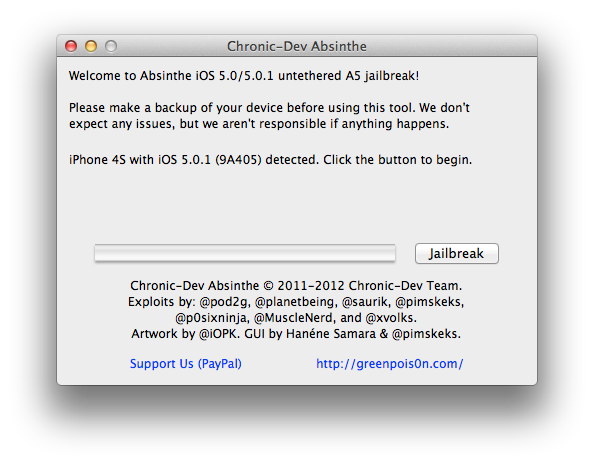
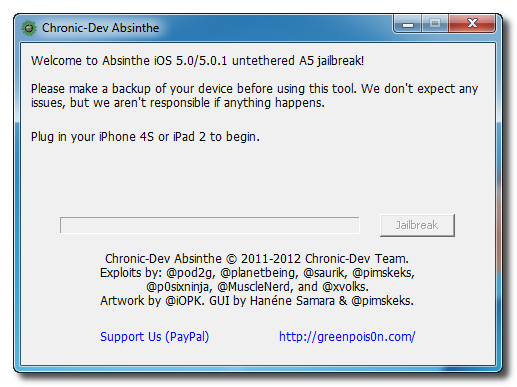
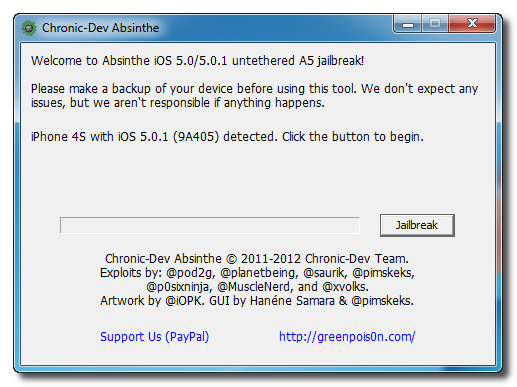
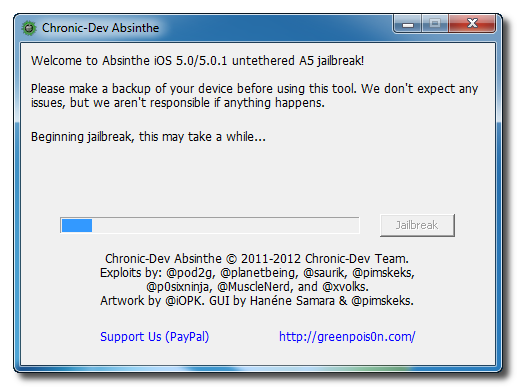
How to Jailbreak Your iPhone 4S Using Absinthe (Windows) [5.0, 5.0.1]

These are instructions on how to perform an untethered jailbreak of your iPhone 4S using Absinthe for Windows.

Warning***: Before you continue make sure to do a backup of your device in iTunes as you may lose your Camera Roll during this process.


Step One
Download the latest version of Absinthe from here.

Step Two
Double click to extract the downloaded archive and launch the Absinthe application.


Step Three
As prompted, connect your iPhone 4S to the computer via USB. Make sure to remove any passcodes or VPN settings you've previously set.

Step Four
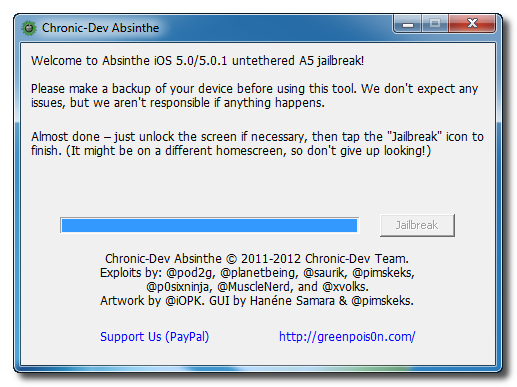
Click the Jailbreak button to begin
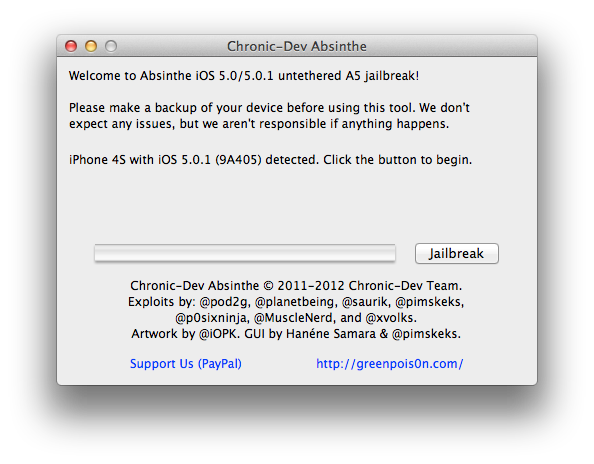

Step Five
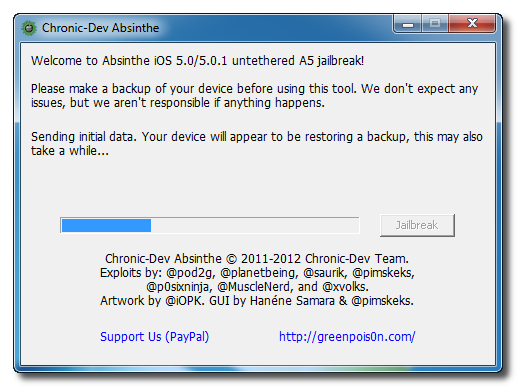
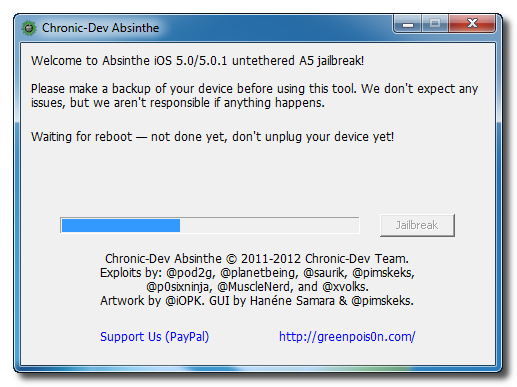
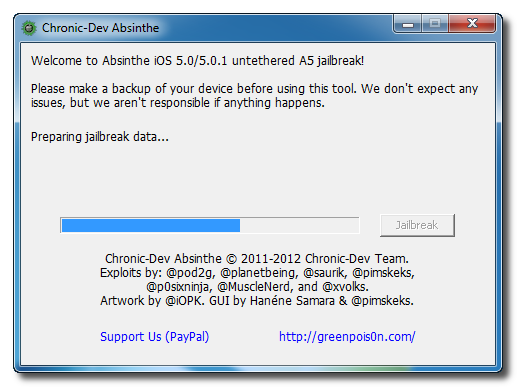
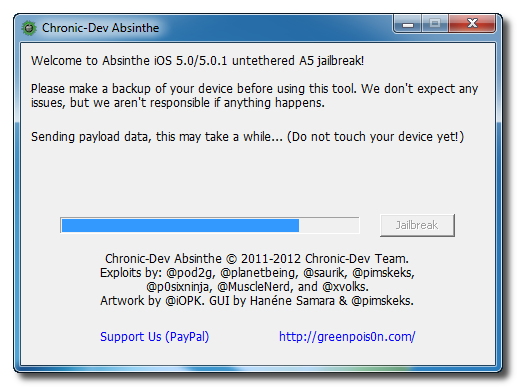
The application will take you through several steps of the jailbreak: Sending initial data, waiting for reboot, waiting for device to finish booting, Preparing jailbreak data, and Sending payload data.
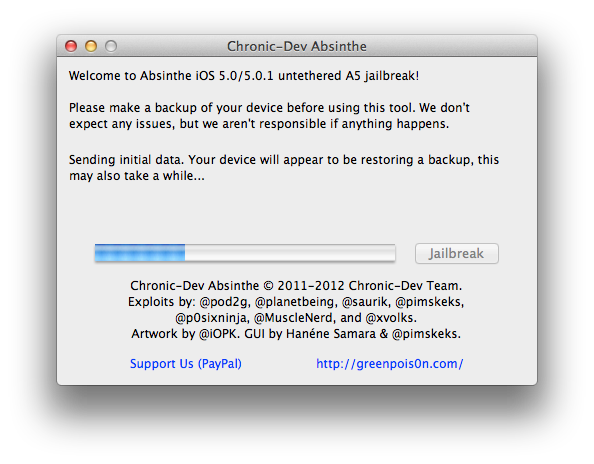
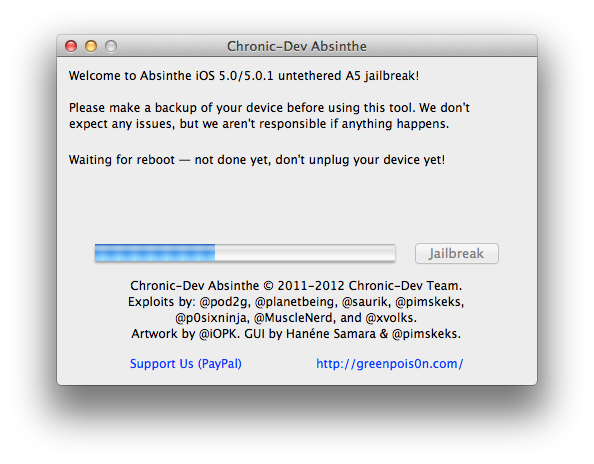
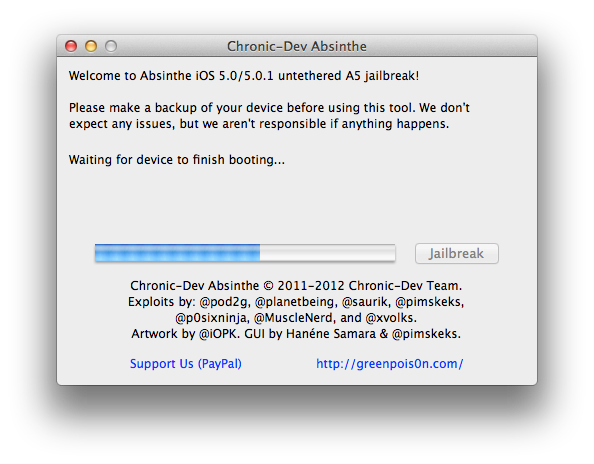
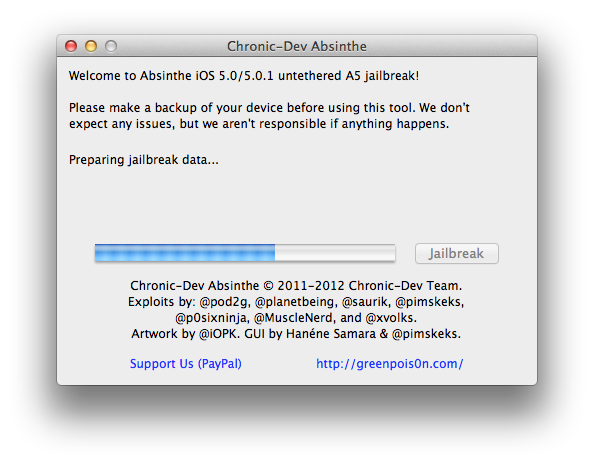
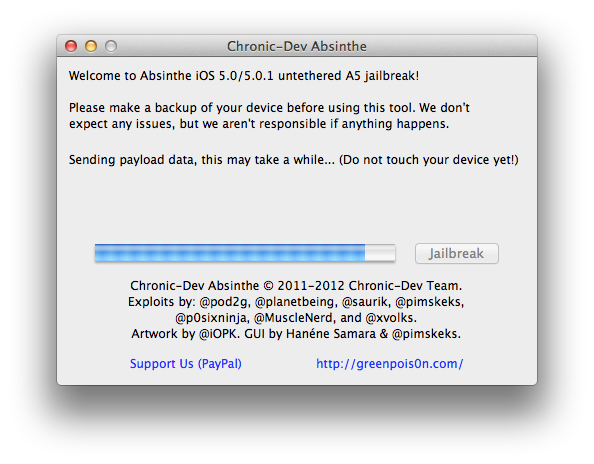


Step Six
You will be informed that the jailbreak is 'Almost done'.
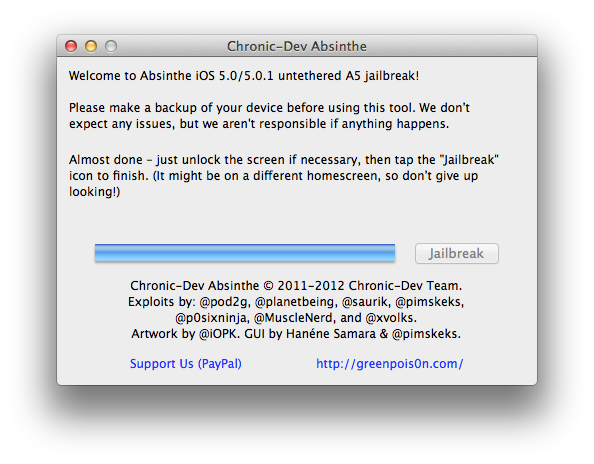

Step Seven
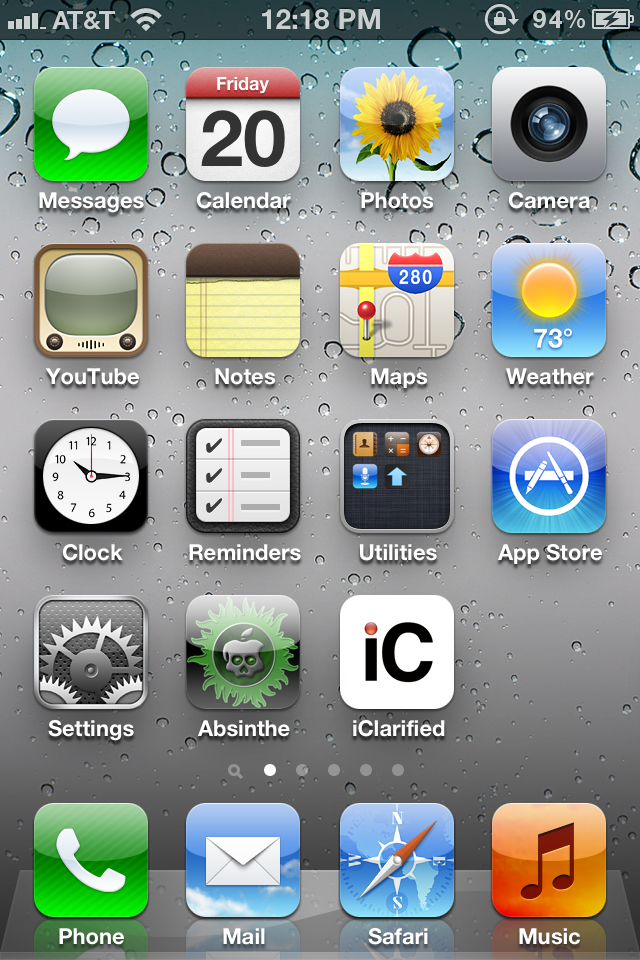
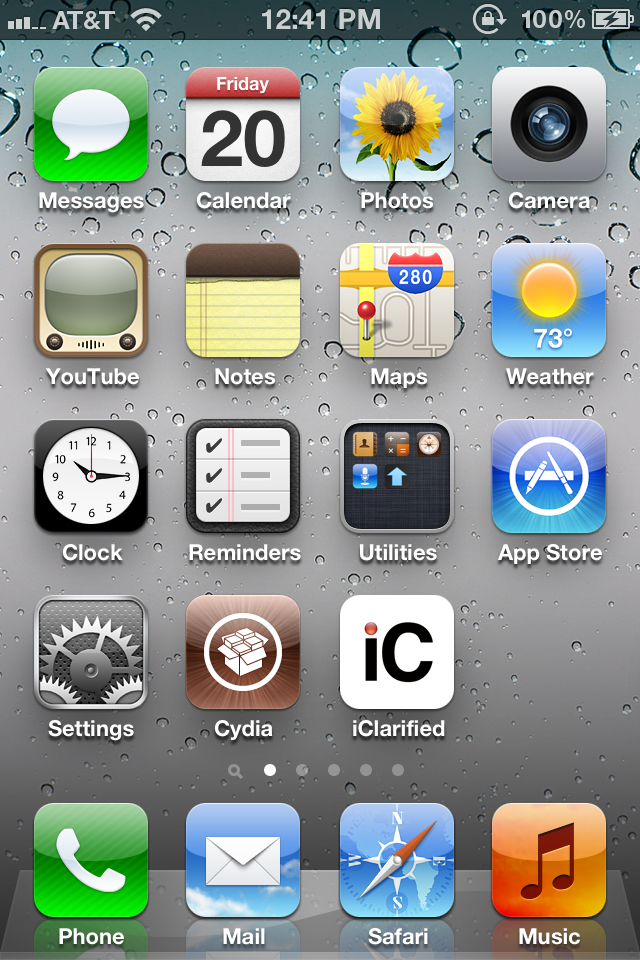
On your device, locate the Absinthe icon and press it to complete your jailbreak. It could be on any homescreen.
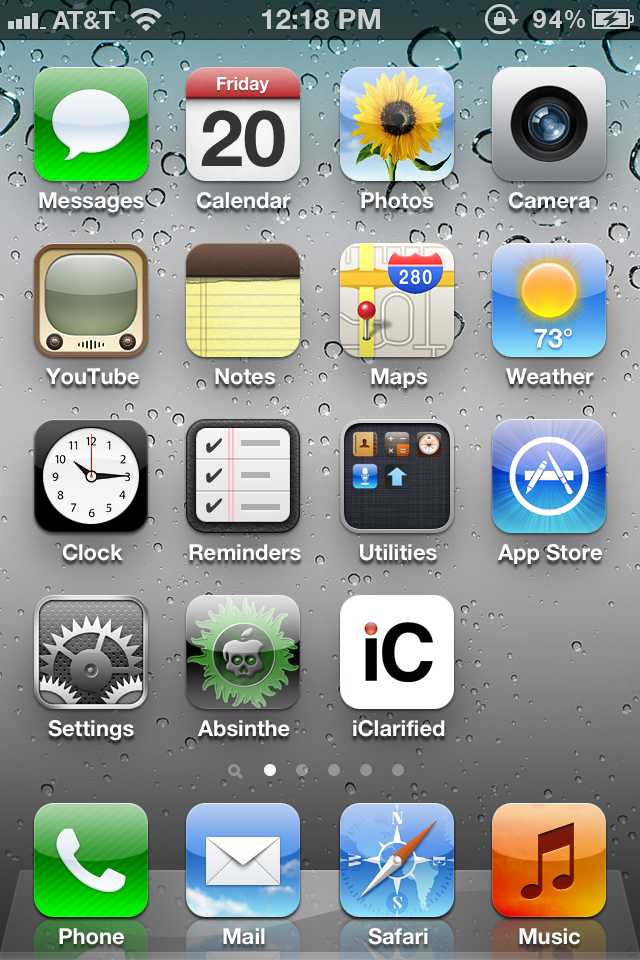

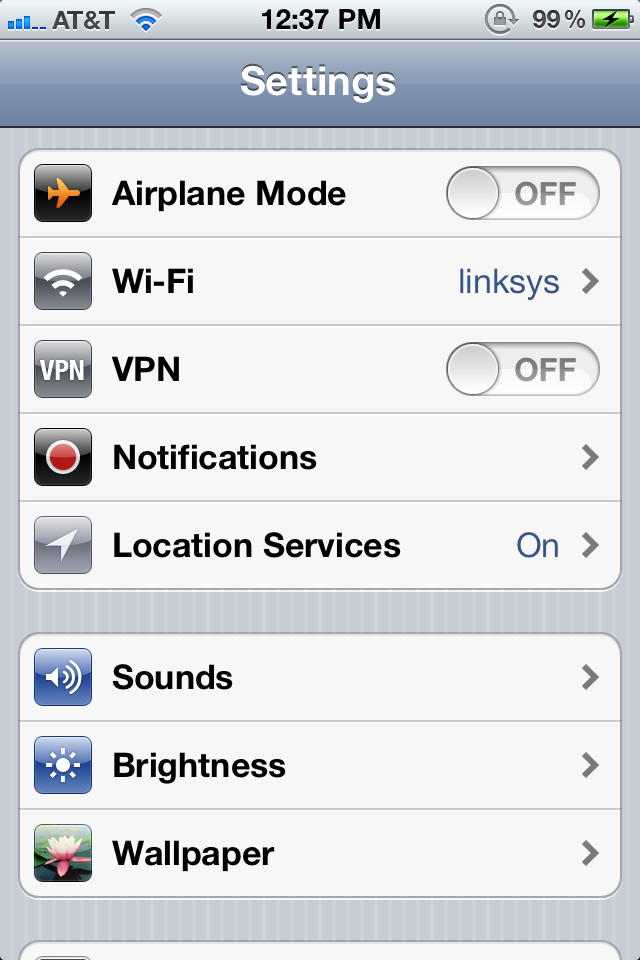
If the server is down and you get an Error establishing a database connection message then tap the Settings icon on your springboard and turn on VPN.
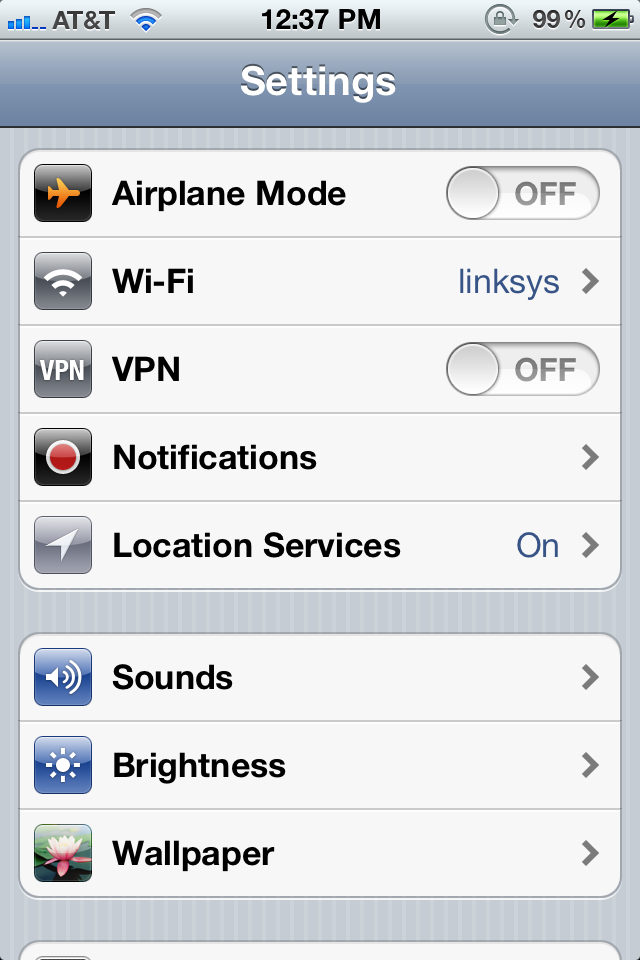

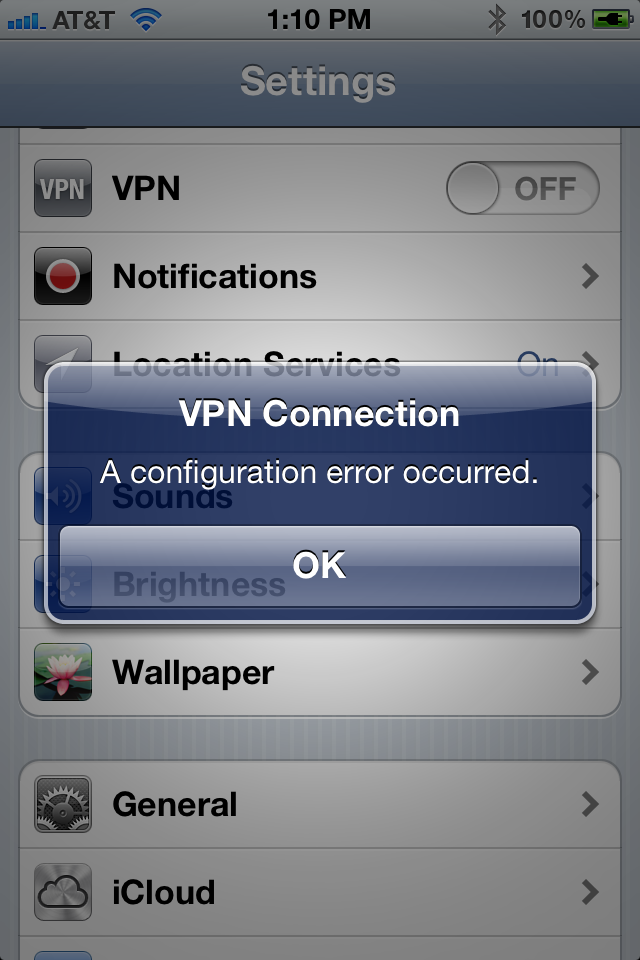
You will get a configuration error; however, after about a minute your device will reboot with Cydia on the Springboard!
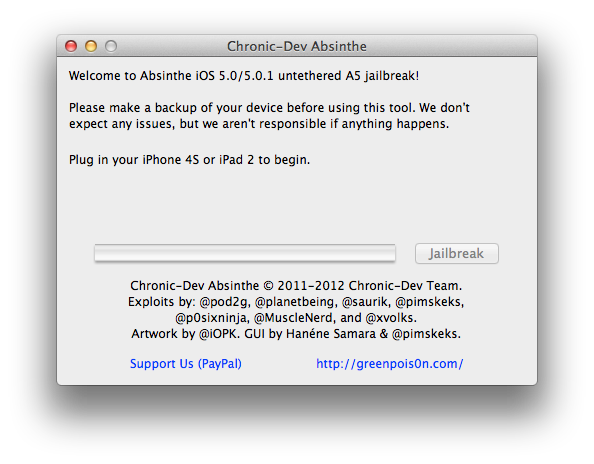
How to Jailbreak Your iPhone 4S Using Absinthe (Mac) [5.0, 5.0.1]

These are instructions on how to perform an untethered jailbreak of your iPhone 4S using Absinthe for Mac.

Warning***: Before you continue make sure to do a backup of your device in iTunes as you may lose your Camera Roll during this process.


Step One
Download the latest version of Absinthe from here.

Step Two
Double click to extract the downloaded archive and launch the Absinthe application.


Step Three
As prompted, connect your iPhone 4S to the computer via USB. Make sure to remove any passcodes or VPN settings you've previously set.


Step Four
Click the Jailbreak button to begin


Step Five
The application will take you through several steps of the jailbreak: Sending initial data, waiting for reboot, waiting for device to finish booting, Preparing jailbreak data, and Sending payload data.


Step Six
You will be informed that the jailbreak is 'Almost done'.


Step Seven
On your device, locate the Absinthe icon and press it to complete your jailbreak. It could be on any homescreen.


If the server is down and you get an Error establishing a database connection message then tap the Settings icon on your springboard and turn on VPN.


You will get a configuration error; however, after about a minute your device will reboot with Cydia on the Springboard!


Jan 20, 2012

CycloneBox Installer v1.17 with Xperia Addon and more

- SE Xperia Unlocker introduced (this is 3rd party addon)
Supported Phones :
Xperia X10 Mini - E10i
Xperia X10 Mini Pro - U20
Xperia X8 - E15i
Xperia W8 - E16 - E16i
Xperia X10
Xperia X10i
Xperia X10a
Docomo SO-01B
All These Phones supported without TEST POINT

- Added Real time SE Xperia Unlocker account Creator in 'Credits' tool. (This is the best option for Online web shop resellers as Addon works without Box)Reseller can generate accounts real time with box) 10 Cyclone credits = 1 Xperia phone log
- BB5 FBUS/USB Loaders v11.40.00 Introduced
- Introduced previous updates (standalone and free Broadcom unlocking, RAPUv21, etc)
- PM Protection is now unticked by default
- PM Protection is automatically unticked during SX4 operations
- Full Erase for New Protocol APE phones fixed (wrong CMT Flash Device Index selected)
-Added New bright skin
- Minor changes and Bugfixes

Download Links
http://www.karwos.hk/CycloneBoxInstaller.exe
http://www.multiupload.com/V6N0F2QLNP

Best Regards
CycloneBox Team

Cyclone Box FREE and STANDALONE Broadcom Hash Read (07-12-2011)


hello

Broadcom Unlocking (via LBF Hash Read)/SX4 Authorization/SD
Repair/etc is now fully FREE and STANDALONE, just simply as
previous models.
No internet connection and credits needed

Just to remind Cyclone is one box which support all of hashes
free and standalone now
This includes reading data from RAP3Gv3, RAP3Gv4, RAPUv1, RAPUv21
(world's first), Broadcom, XGold1, and shortly from XGold2 (maybe
free, maybe with credits, we'll decide).

NOTE
No firmware upgrade is needed. Just run Cyclone and it will auto-update main exe + loaders.

Make sure you have latest installer installed, if not, grab one
from http://www.karwos.hk/CycloneBoxInstaller.exe
Box Firmware version required: v01.82 (from Nov 12)

No Box Firmware Upgrade needed if u have that version (1.82).


Best Regards,
Cyclone Box Team

Cyclone Box Broadcom Unlocker Released


Added support for reading Unique Data files for Broadcom 21351 based
Nokia Phones
C3-00 RM-614
X2-00 RM-618
X2-01 RM-709
X2-03 RM-709
X2-01.1 RM-717
7020 RM-497
2710c RM-586
and more...

After read Unique Data you can:
- Unlock SP locks by reading LBF data
- Backup FULL RPL (including superdonlge) 100% Nokia-Like
- Repair corrupted Superdongle keys
- Authorize your phone with SX4 emulation inside box
- Detailed Security Analysis
- Downgrade this phones
- More ...

PS1 : Server connection and 10 credits (with 100 credits threshold) required to perform Broadcom Uni Data dump.


PS2: After reading uni data, all operations is standalone (just
likely previous basing upon cached data)

PS3: Server charged credits, but my phone got disconnected during
hash read operation, and hash not readen. What to do, what to do? If
your account has been charged, the data generated at server are
cached too... That means you can repeat process again (previously
charging battery, i.e.), server transaction will be succeeded and no
credits charged.

NOTE
Box firmware v01.82 is required to use this update.
Software and loaders should be automatically updated.
In case if you have aborted your update process, and now having
problem with running app - you can download http://www.karwos.hk/updater/Cyclone.exe and place it in your Cyclone directory...


MORE COMING !!!
Best Regards,
Cyclone Box Team

http://www.cyclonebox.com/

Download Nokia PC Suite 7.1.180.46

Free application for Nokia phones that lets you edit, synchronize and back up many of your phone's files

Written by Bogdan Popa on January 16th, 2012

Nokia PC Suite is an application designed to enable Nokia phone owners to transfer important files from the mobile phone to the computer and vice versa, but also to control some of the handheld's features straight from the desktop.

The tool is supposed to provide some new functions to those who purchased a Nokia phone, including editing, backing up and synchronizing the files. Nokia PC Suite pretty much does that, as it is an easy to use application with a very pleasant and intuitive interface you should become accustomed with in a matter of minutes.

All functions can be accessed from the main interface, as soon as the phone is successfully connected to the computer. There are four connectivity options available: Bluetooth, infrared, serial cable (CA-42) and USB cable, with the last one being the fastest.

At times, some connection problems may occur while trying to pair the mobile phone and the computer. Also file transfer or other functions of the application could become unavailable. If this occurs, your should disconnect the devices and try to establish a new connection.

The messaging function of Nokia PC Suite comes in quite handy since it allows you to write an SMS message on you computer and send it to someone in the address book. However, note that the message is not automatically transferred to the phone's “Sent” menu.

The synchronization and backup features enable you to keep the important content stored on your Nokia phone safe and ready for a quick restore. You can sync notes, contacts and calendar and thus keep them up to date on both computer and mobile device.

Another very useful function you will find in Nokia PC Suite is the video viewing and conversion. You can use it to turn any movie into the video format supported by your Nokia phone.

Bundling a lot of powerful functions that allow you to effortlessly control and manage the content on your mobile phone, Nokia PC Suite offers a pleasant experience overall.

Download

Jan 17, 2012

Samsung 2g tool 3.5.0031 Update

http://www.openunlock.com/content/attachments/2143-z3xbox.jpg.html?cid=18
Samsung 2g tool 3.5.0031 Update

- Added S5780 flash, read code, unlock, imei repair, Repair SWAP
- Added E2600 flash, read code, unlock, imei repair via patch firmware first in the world
- Added C3310 flash, read code, unlock, imei repair via patch firmware first in the world
- Added C3312 flash, read code, unlock, imei repair via patch firmware first in the world
- Added C3330 flash, read code, unlock, imei repair via patch firmware first in the world
- Added C3332 flash, read code, unlock, imei repair via patch firmware first in the world
- Added C3350 flash, read code, unlock, imei repair via patch firmware first in the world
- Added C3520 read code, unlock, imei repair via micro-uart cable in TAT mode first in the world


HOWTO:
For unlock or repair E2600, C3310, C3312, C3330, C3332, C3350, C3520 just flash via Z3X any original firmware
and then do repair or unlock

Jan 11, 2012

MXKEY v3.5 revision 1.7, Public-Release

Latest news

MXKEY v3.5 revision 1.7, Public-Release

Published: Sun, 08 Jan 2012 00:55:21 GMT


v3.5 revision 1.7, Public-Release
changes:

- Nokia Tool
added:
SL3 RSA Signature verify on "Read Hash", sha readed by MX now is 100% valid
Disk usage info on fire.exe
improvements:
file version indentification for installed data package
phone images definitions in now synched with fire tool
pinout images updated
bugfix:
rapido usb bootstrap causing BSOD
xgold not booting
[sl3bf], oclHashcat 00.08 speed not shown
hti drivers updated
updated sl3u to version 1.7
added: Master sp code verification on calculate cod
improved: online logger function
updated sl3bf to version 3.6
added: Master sp code verification after bf task finished
bugfix: oclHashcat-lite-0.08 with "--outfile-format=1" problem
and minor bugs fixed
Public discussions thread

source
and Download here
http://www.mxkey.biz/

Jan 9, 2012

All Blackberry schematics

Here All blackberry schematics

1. BB8900


2. BB8900 PCB2


3. BB9630


4. BB9630-2


5. BB9500 ( Strom )


6. BB9500-2


7. BB9000


..:: X.Ram ::..

Followers